New Paid
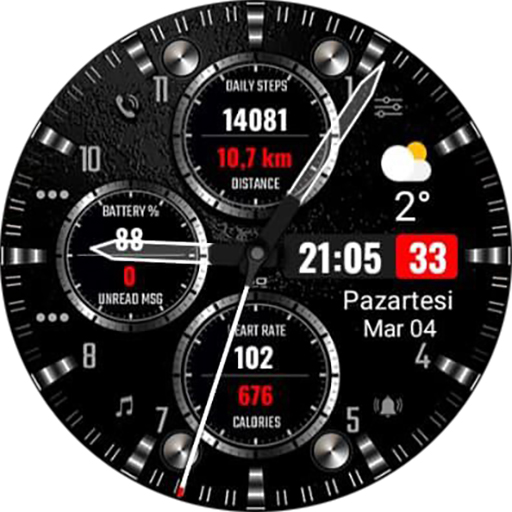
S200 Hybrid Watchface
by Saint On
Sport Style Hybrid watchface for wear os
Downloads1,000+
Total reviewsNo data available
Average scoreNo data available
Released on Google PlayMar 5, 2024
Last updated on Google PlayOct 23, 2024
DiscoveredAug 2, 2026
Last updatedAug 19, 2026
S200 Designed for Wear OS
[ Only for Wear OS devices - API 30+ ]
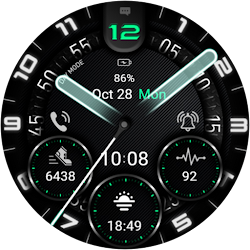
S200 Hybrid and Quality watch face.
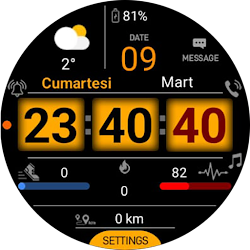
You will get 14 color combinations with a single Watch face.
***Oppo and square watch models are not currently supported!
INSTALLATION NOTES:
1 - Make sure the watch is properly connected to the phone, open the Phone App on the phone and tap "DOWNLOAD TO THE WATCH" and follow the instructions on the watch.
After a few minutes of tapping the install button on the watch, the watch face will be installed. You can choose the installed watch face.
The Phone app merely acts as a placeholder to make it easier to set up and find the watch face on your Wear OS watch
Note: If you get stuck in the payment loop, DON'T WORRY, only one payment will be made even if you are asked to pay a second time. Wait 5 minutes or restart your watch and try again.
There may be a synchronization issue between your device and Google servers.
or
2 - Alternatively, try installing the watch face from the web browser on your PC.
Please note that issues on this side are NOT developer-related. The developer does not have any control over the Play Store from this side. thanks.
Stay healthy with sports, succeed with follow-up, keep your life under control!
FEATURES
● 14 different color variants.
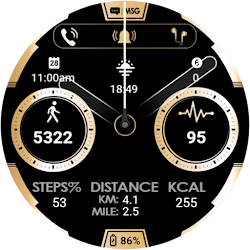
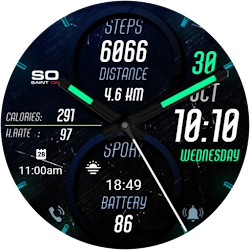
● Steps - Battery - Heart rate (Wrist) - 1 special complication.
● Always-on display supported
● Manual measurement by touching heart rate
For full functionality, please enable Sensors and Complications data retrieval permissions manually!
Internet
https://www.saintonwf.com
INSTAGRAM
https://www.instagram.com/Saint_0n
FACEBOOK
https://www.facebook.com/saintonwf
[ Only for Wear OS devices - API 30+ ]
S200 Hybrid and Quality watch face.
You will get 14 color combinations with a single Watch face.
***Oppo and square watch models are not currently supported!
INSTALLATION NOTES:
1 - Make sure the watch is properly connected to the phone, open the Phone App on the phone and tap "DOWNLOAD TO THE WATCH" and follow the instructions on the watch.
After a few minutes of tapping the install button on the watch, the watch face will be installed. You can choose the installed watch face.
The Phone app merely acts as a placeholder to make it easier to set up and find the watch face on your Wear OS watch
Note: If you get stuck in the payment loop, DON'T WORRY, only one payment will be made even if you are asked to pay a second time. Wait 5 minutes or restart your watch and try again.
There may be a synchronization issue between your device and Google servers.
or
2 - Alternatively, try installing the watch face from the web browser on your PC.
Please note that issues on this side are NOT developer-related. The developer does not have any control over the Play Store from this side. thanks.
Stay healthy with sports, succeed with follow-up, keep your life under control!
FEATURES
● 14 different color variants.
● Steps - Battery - Heart rate (Wrist) - 1 special complication.
● Always-on display supported
● Manual measurement by touching heart rate
For full functionality, please enable Sensors and Complications data retrieval permissions manually!
Internet
https://www.saintonwf.com
https://www.instagram.com/Saint_0n
https://www.facebook.com/saintonwf
Follow Saint On — new faces in your inbox
One email per day at most — a single digest of yesterday's newly indexed watch faces from all developers you follow. Double opt-in, one-click unsubscribe, nothing else ever.
More from Saint On