New Paid
NW119한글: DIgital watch face
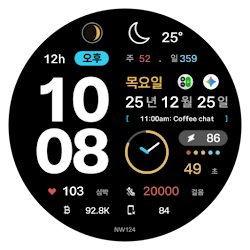
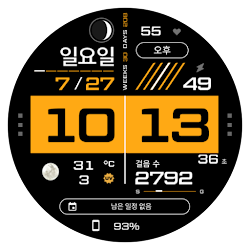
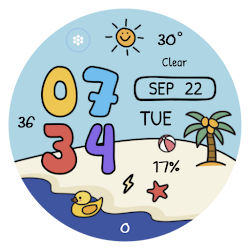
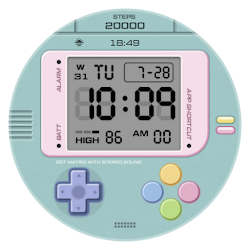
This is the NW119 digital watch face exclusively for Korean made by Nine Watch.
Downloads50+
Total reviewsNo data available
Average scoreNo data available
Released on Google Play–
Last updated on Google PlayNov 21, 2025
DiscoveredAug 4, 2026
Last updatedAug 15, 2026
[How to Install a Watch Face]
1. Install via the Companion App
Open the Companion App installed on your smartphone > Tap the Download button > Install the watch face on your watch.
2. Install via the Play Store app
Access the Play Store app > Tap the '▼' button to the right of the price button > Select your watch > Purchase
Long-press the watch screen to check if the watch face has been installed. If the watch face isn't installed after 10 minutes, install it directly from the Play Store website or from your watch.
3. Install via the Play Store web browser
Access the Play Store web browser > Tap the price button > Select your watch > Install and Purchase
4. Install directly from your watch
Access the Play Store > Search for "NW120" in Korean > Install and Purchase
---------------------------------------------------------------------------------------------------------------
This watch face supports only Korean.
#Information and Features
[Time and Date]
Digital Time (12/24H)
Date
Always on Display
[Information (Device, Health, Weather, etc.)]
Watch Battery
Heart Rate
Current Step Count
[Customization]
10 Colors
1 Complication (Fixed)
7 App Shortcuts
*This watch face supports Wear OS devices.
1. Install via the Companion App
Open the Companion App installed on your smartphone > Tap the Download button > Install the watch face on your watch.
2. Install via the Play Store app
Access the Play Store app > Tap the '▼' button to the right of the price button > Select your watch > Purchase
Long-press the watch screen to check if the watch face has been installed. If the watch face isn't installed after 10 minutes, install it directly from the Play Store website or from your watch.
3. Install via the Play Store web browser
Access the Play Store web browser > Tap the price button > Select your watch > Install and Purchase
4. Install directly from your watch
Access the Play Store > Search for "NW120" in Korean > Install and Purchase
---------------------------------------------------------------------------------------------------------------
This watch face supports only Korean.
#Information and Features
[Time and Date]
Digital Time (12/24H)
Date
Always on Display
[Information (Device, Health, Weather, etc.)]
Watch Battery
Heart Rate
Current Step Count
[Customization]
10 Colors
1 Complication (Fixed)
7 App Shortcuts
*This watch face supports Wear OS devices.
Follow 9INE watchfaces — new faces in your inbox
One email per day at most — a single digest of yesterday's newly indexed watch faces from all developers you follow. Double opt-in, one-click unsubscribe, nothing else ever.
More from 9INE watchfaces