New Paid
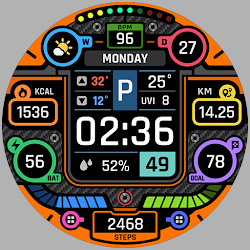
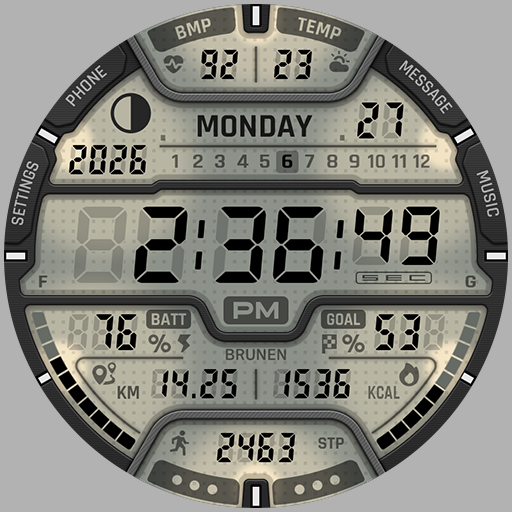
BRN167 - TALON Digital
This watch face is a Modern Digital watch face for Wear OS by BRUNEN.
Downloads10+
Total reviewsNo data available
Average scoreNo data available
Released on Google PlayFeb 13, 2026
Last updated on Google PlayAug 13, 2026
DiscoveredJun 21, 2026
Last updatedAug 16, 2026
This watch face was designed with Only for Wear OS 5 and later devices.
FEATURES:
- Digital time ( 12/24hr )
- Date / Day of the week / Month /Year
- Steps counter and daily step goal
- Battery percent indicator
- Heart rate indicator ( works only while wearing the watch ) *
- Moved distance KM / MI **
- Burned calorie ***
- Current temperature
- Moonphase
- 10 LCD screen color styles
- 2 AOD styles
- 8 Preset app shortcuts
- 3 Customizable app shortcuts
NOTE:
* The watch face does not automatically measure and show Heart rate.You can measure your heart rate or change the measurement interval by running the connected application.
** Miles are displayed for UK and US English selections, and KM for all other languages.
*** The numbers may differ from other apps because the measurement method is different. Calories are calculated based solely on steps.
Some features may not be available on some watches.
Customization:
1 - Touch and hold the display
2 - Tap on customize option
CONTACT:
brunenwatch@gmail.com
Please send us any questions.
Check out more details and news.
Instagram : https://www.instagram.com/brunen.watch
More from BRUNEN Design :
https://play.google.com/store/apps/dev?id=5835039128007798283
Thank you for using our watch faces.
FEATURES:
- Digital time ( 12/24hr )
- Date / Day of the week / Month /Year
- Steps counter and daily step goal
- Battery percent indicator
- Heart rate indicator ( works only while wearing the watch ) *
- Moved distance KM / MI **
- Burned calorie ***
- Current temperature
- Moonphase
- 10 LCD screen color styles
- 2 AOD styles
- 8 Preset app shortcuts
- 3 Customizable app shortcuts
NOTE:
* The watch face does not automatically measure and show Heart rate.You can measure your heart rate or change the measurement interval by running the connected application.
** Miles are displayed for UK and US English selections, and KM for all other languages.
*** The numbers may differ from other apps because the measurement method is different. Calories are calculated based solely on steps.
Some features may not be available on some watches.
Customization:
1 - Touch and hold the display
2 - Tap on customize option
CONTACT:
brunenwatch@gmail.com
Please send us any questions.
Check out more details and news.
Instagram : https://www.instagram.com/brunen.watch
More from BRUNEN Design :
https://play.google.com/store/apps/dev?id=5835039128007798283
Thank you for using our watch faces.
Follow BRUNEN Watch Faces — new faces in your inbox
One email per day at most — a single digest of yesterday's newly indexed watch faces from all developers you follow. Double opt-in, one-click unsubscribe, nothing else ever.
More from BRUNEN Watch Faces