New Free
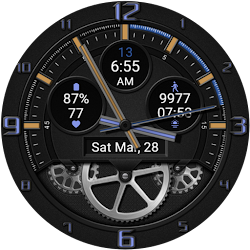
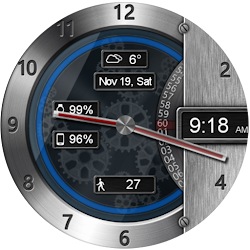
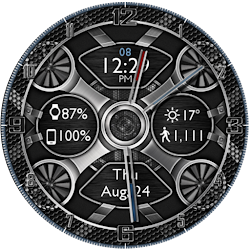
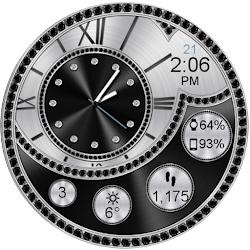
Dashing Gears HD WatchFace
by DeNitE Appz
Animated Watch Face Widget & Live Wallpaper Battery, Date, Weather, Step Counter
Downloads10,000+
Total reviewsNo data available
Average score★ 1.30
Released on Google PlayOct 5, 2017
Last updated on Google PlayJun 12, 2022
DiscoveredAug 10, 2026
Last updatedAug 16, 2026
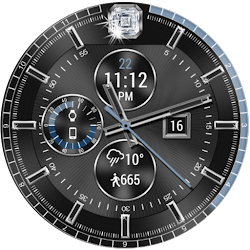
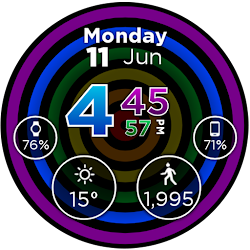
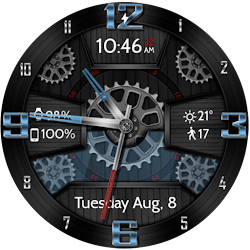
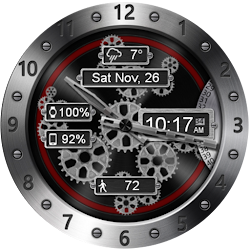
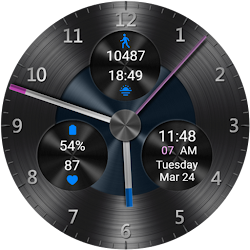
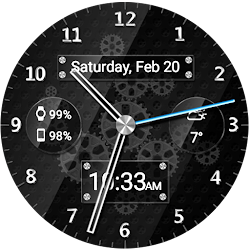
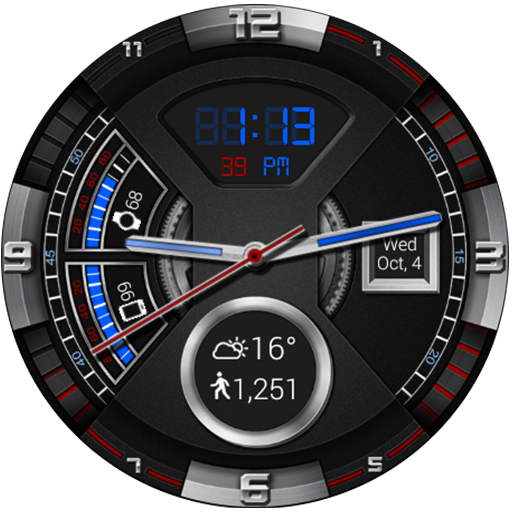
This completely customizable interactive HD Wear OS Watch Face, Clock Widget & Live Wallpaper brings a classic elegance to your wrist and Launcher. Features include custom complications, battery levels, weather conditions, step counter, color picker & date information. A settings app will also be installed on your mobile device to configure the watch face for any look you desire. Select any color and create a completely custom look for yourself! Don't have a Wear OS watch? No Problem! You can use the clock widget or Live Wallpaper on your launcher!
⭐ Compatible with all Wear OS watches including the new Samsung Galaxy Watch 4 & 5 Series! ⭐
❗ IMPORTANT ❗ - Not compatible with Samsung Watches that use Tizen or other smartwatches with other operating systems than Wear OS.
★Basic Features★
✔ Launcher Clock Widget (No animations or second hand due to battery consumption) (Mobile Only)
✔ Customizable digital & or analog clock
✔ Time zone selection
✔ Smooth second hand
✔ 24-Hour
✔ Burn-In protection
✔ Square Compatible
★Premium Features★
✔ Animated (Only watch face - NOT Widget)
✔ Widget Frames
✔ Live Wallpaper (Animated)
✔ Custom Complications
✔ Screen Modes (Normal, Always Ambient, Always On)
✔ Screen on Time selection
✔ Interactive Actions (Currently unavailable on Samsung Watch 4/5)
✔ Ambient modes selector
✔ Color picker to select any color you like for the background, clock hands, text, & numbers
✔ Save personal color themes (long press to delete theme)
✔ Clock numbers toggle
✔ Watch battery status
✔ Phone battery status (When connected to an Android Phone)
✔ Current date
✔ Step Counter
✔ Weather conditions (Yahoo Weather & OpenWeatherMap) (When connected to an Android Phone)
★Translations★
✔ English
✔ Chinese
✔ Czech
✔ Dutch
✔ French
✔ German
✔ Italian
✔ Japanese
✔ Korean
✔ Russian
✔ Spanish
✔ Swedish
★How to install★
Watch Face - Once you have installed from the Play store, you may be asked to grant permissions to the app on your phone - be sure to approve all permissions. Once the app has installed on your phone, it may take 5-10 minutes to transfer over to you watch and the Wear OS app. Please be patient. Once installed, simply long press on your watch face to bring up the selection menu, or select this watchface from the Wear OS app. Use the accompanying settings app to configure the settings and options
Widget - Depending on what launcher you are using, you can either long press on your launcher to place a widget, or select this widget from the App Drawer -> Widgets list. Customize and change the widget settings with the accompanying App.
Live Wallpaper - Depending on what launcher you are using, you can either long press on your launcher to select your Wallpaper, or you can select the Live Wallpaper from the Settings App
If you have any problems at all, please send me an email before leaving a negative review - I will do my best to fix the issue as soon as possible.
★Trouble Shooting★
http://deniteappz.com/watchface/troubleshooting.html
Stay tuned for more watch faces to come!
⭐ Compatible with all Wear OS watches including the new Samsung Galaxy Watch 4 & 5 Series! ⭐
❗ IMPORTANT ❗ - Not compatible with Samsung Watches that use Tizen or other smartwatches with other operating systems than Wear OS.
★Basic Features★
✔ Launcher Clock Widget (No animations or second hand due to battery consumption) (Mobile Only)
✔ Customizable digital & or analog clock
✔ Time zone selection
✔ Smooth second hand
✔ 24-Hour
✔ Burn-In protection
✔ Square Compatible
★Premium Features★
✔ Animated (Only watch face - NOT Widget)
✔ Widget Frames
✔ Live Wallpaper (Animated)
✔ Custom Complications
✔ Screen Modes (Normal, Always Ambient, Always On)
✔ Screen on Time selection
✔ Interactive Actions (Currently unavailable on Samsung Watch 4/5)
✔ Ambient modes selector
✔ Color picker to select any color you like for the background, clock hands, text, & numbers
✔ Save personal color themes (long press to delete theme)
✔ Clock numbers toggle
✔ Watch battery status
✔ Phone battery status (When connected to an Android Phone)
✔ Current date
✔ Step Counter
✔ Weather conditions (Yahoo Weather & OpenWeatherMap) (When connected to an Android Phone)
★Translations★
✔ English
✔ Chinese
✔ Czech
✔ Dutch
✔ French
✔ German
✔ Italian
✔ Japanese
✔ Korean
✔ Russian
✔ Spanish
✔ Swedish
★How to install★
Watch Face - Once you have installed from the Play store, you may be asked to grant permissions to the app on your phone - be sure to approve all permissions. Once the app has installed on your phone, it may take 5-10 minutes to transfer over to you watch and the Wear OS app. Please be patient. Once installed, simply long press on your watch face to bring up the selection menu, or select this watchface from the Wear OS app. Use the accompanying settings app to configure the settings and options
Widget - Depending on what launcher you are using, you can either long press on your launcher to place a widget, or select this widget from the App Drawer -> Widgets list. Customize and change the widget settings with the accompanying App.
Live Wallpaper - Depending on what launcher you are using, you can either long press on your launcher to select your Wallpaper, or you can select the Live Wallpaper from the Settings App
If you have any problems at all, please send me an email before leaving a negative review - I will do my best to fix the issue as soon as possible.
★Trouble Shooting★
http://deniteappz.com/watchface/troubleshooting.html
Stay tuned for more watch faces to come!
Follow DeNitE Appz — new faces in your inbox
One email per day at most — a single digest of yesterday's newly indexed watch faces from all developers you follow. Double opt-in, one-click unsubscribe, nothing else ever.
More from DeNitE Appz