New Paid
Predator's Watch | Illuminator
by WatchBase
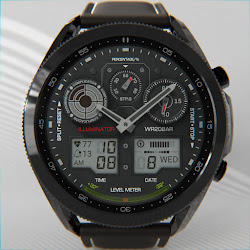
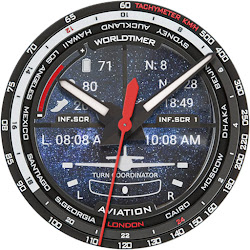
Predator inspired illuminator watch face
Downloads1,000+
Total reviewsNo data available
Average scoreNo data available
Released on Google PlayJul 11, 2023
Last updated on Google PlayOct 29, 2025
DiscoveredAug 15, 2026
Last updatedAug 15, 2026
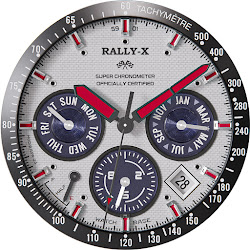
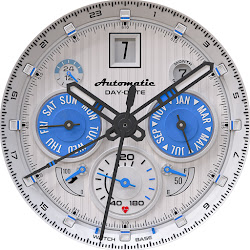
A Wear OS super realistic and easy to read Predator inspired style digital illuminator watch face with 3 custom complications and beautiful night modes.
NOTE: Please read the How to section and Installation section !!!
ⓘ Features:
- Realistic design.
- Predator inspired design.
- GMT Time.
- 3 custom complications.
- Auto 12h/24h mode.
- Night modes.
- Time and date.
- Battery indicator.
- Steps goal indicator.
- Notifications count.
- Alway On Display.
ⓘ How to:
- Long press (touch and hold) on the screen to customize hands color.
Want another SUPER REALISTIC watch face? Grab them here:
The ORIGINAL Illuminator watch face: https://play.google.com/store/apps/details?id=wb.illuminator.digital - ONLY 0.49$
Luna Benedicta: https://play.google.com/store/apps/details?id=wb.luna.benedicta
WatchBase. Illuminator: https://play.google.com/store/apps/details?id=wb.illuminator.hybrid
ⓘ Heart rate info
Heart rate is updated automatically every hour. It might show '0' when you first install and apply the watch face.
ⓘ Installation
How to install: https://watchbase.store/static/ai/
After installation: https://watchbase.store/static/ai/ai.html
If you have any issues installing the watch face, please note that we have no control over the installation process or any other Google Play / Watch processes. The most common issue that people face is after they buy the watch face and install it, they can't see/find it.
In order to apply the watch face after you install it, touch and hold on the main screen (your current watch face) the swipe left to look for it. If you can't see it, tap on the " + " sign at the end (add a watch face) and find our watch face there.
We use a companion app for the phone to make the installation process easier. If you buy our watch face, tap on the install button (on the phone app) you must check your watch.. a screen will appear with the watch face.. tap install again and wait for the installation to finish. If you already bought the watch face and it still asks you to buy it again on the watch, don't worry you will not be charged twice. This is a common synchronization issue, just wait a little or try to restart your watch.
Another solution for installing the watch face is to try to install it from a browser, logged with your account (google play account that you use on the watch).
JOIN WatchBase.
Facebook page:
https://www.facebook.com/WatchBase
Facebook group (General watch faces group):
https://www.facebook.com/groups/1170256566402887/
Instagram:
https://www.instagram.com/watch.base/
YouTube:
https://www.youtube.com/@WATCHBASE/videos
Google Play page:
https://play.google.com/store/apps/developer?id=WatchBase
SUBSCRIBE to our YouTube channel:
https://www.youtube.com/c/WATCHBASE?sub_confirmation=1
https://www.youtube.com/c/WATCHBASE
NOTE: Please read the How to section and Installation section !!!
ⓘ Features:
- Realistic design.
- Predator inspired design.
- GMT Time.
- 3 custom complications.
- Auto 12h/24h mode.
- Night modes.
- Time and date.
- Battery indicator.
- Steps goal indicator.
- Notifications count.
- Alway On Display.
ⓘ How to:
- Long press (touch and hold) on the screen to customize hands color.
Want another SUPER REALISTIC watch face? Grab them here:
The ORIGINAL Illuminator watch face: https://play.google.com/store/apps/details?id=wb.illuminator.digital - ONLY 0.49$
Luna Benedicta: https://play.google.com/store/apps/details?id=wb.luna.benedicta
WatchBase. Illuminator: https://play.google.com/store/apps/details?id=wb.illuminator.hybrid
ⓘ Heart rate info
Heart rate is updated automatically every hour. It might show '0' when you first install and apply the watch face.
ⓘ Installation
How to install: https://watchbase.store/static/ai/
After installation: https://watchbase.store/static/ai/ai.html
If you have any issues installing the watch face, please note that we have no control over the installation process or any other Google Play / Watch processes. The most common issue that people face is after they buy the watch face and install it, they can't see/find it.
In order to apply the watch face after you install it, touch and hold on the main screen (your current watch face) the swipe left to look for it. If you can't see it, tap on the " + " sign at the end (add a watch face) and find our watch face there.
We use a companion app for the phone to make the installation process easier. If you buy our watch face, tap on the install button (on the phone app) you must check your watch.. a screen will appear with the watch face.. tap install again and wait for the installation to finish. If you already bought the watch face and it still asks you to buy it again on the watch, don't worry you will not be charged twice. This is a common synchronization issue, just wait a little or try to restart your watch.
Another solution for installing the watch face is to try to install it from a browser, logged with your account (google play account that you use on the watch).
JOIN WatchBase.
Facebook page:
https://www.facebook.com/WatchBase
Facebook group (General watch faces group):
https://www.facebook.com/groups/1170256566402887/
Instagram:
https://www.instagram.com/watch.base/
YouTube:
https://www.youtube.com/@WATCHBASE/videos
Google Play page:
https://play.google.com/store/apps/developer?id=WatchBase
SUBSCRIBE to our YouTube channel:
https://www.youtube.com/c/WATCHBASE?sub_confirmation=1
https://www.youtube.com/c/WATCHBASE
Follow WatchBase — new faces in your inbox
One email per day at most — a single digest of yesterday's newly indexed watch faces from all developers you follow. Double opt-in, one-click unsubscribe, nothing else ever.
More from WatchBase