New Paid
Nothing Minimal Watch Face
by Turcu Radu
Nothing Theme Watch Face with multiple features
Downloads50+
Total reviewsNo data available
Average scoreNo data available
Released on Google PlayJan 24, 2025
Last updated on Google PlayJan 24, 2025
DiscoveredAug 18, 2026
Last updatedAug 18, 2026
Nothing Minimal Watch Face – Because Less is More! ⌚✨
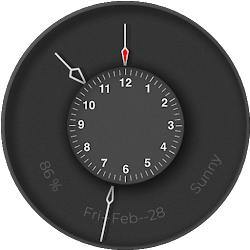
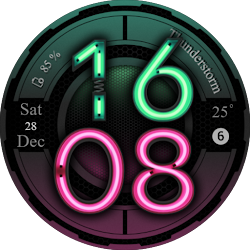
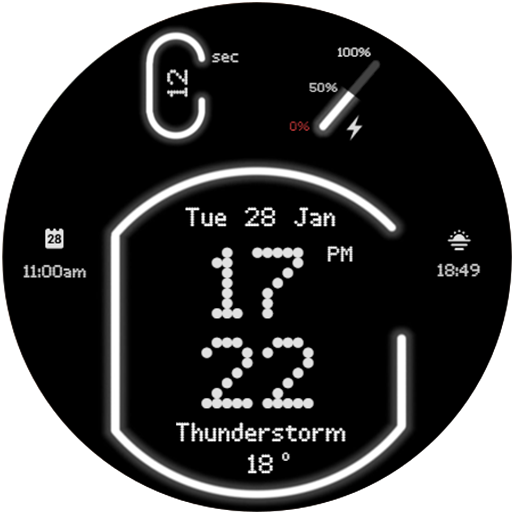
Experience the art of minimalism with the Nothing Minimal Watch Face, a sleek and futuristic neon-themed design that brings simplicity and style to your smartwatch. With smooth neon animations, customizable AM/PM or 24H clock, and detailed battery and weather information, it’s everything you need – and nothing you don’t! Featuring 2 customizable widgets and multiple color options, it's the perfect blend of elegance and functionality.
Key Features:
🔹 Nothing but Style: Neon-inspired minimal design for a futuristic look.
🔹 Animated Neon Seconds: A dynamic glow that keeps things exciting.
🔹 Selectable AM/PM or 24H Clock: Choose your preferred time format.
🔹 Full Date Display: Stay informed at a glance.
🔹 Battery & Weather Info: Track your power and forecast with ease.
🔹 2 Customizable Widgets: Add your personal touch.
🔹 Multiple Colors: Match your mood or style effortlessly.
Why Choose Nothing?
✨ Because simplicity is the ultimate sophistication.
✨ A stylish choice for lovers of clean, modern designs.
✨ Focus on what matters – no clutter, just perfection.
Download Nothing Minimal Watch Face today and embrace the power of simplicity!
--------------------------------------------------------------------------------------------------------
Watch face installation notes on smart watch:
Phone app serves only as a placeholder to make it easier to install & find the watch face on your Wear OS watch. You have to select your watch device from the install dropdown menu.
If you download the helper directly with the phone , you need to open application and touch on the display or the download button. -> will start to install on the watch.
A wear os watch need to be connected.
If not working in that way , you can copy that link into your phone chrome browser and click on arrow down from right , and you choose the watch face to install.
..............................................
After installation you need to set that watch face to your screen , from wear OS app , go down at downloaded watch faces and you will find it.
If you have problems , please contact me on raduturcu03@gmail.com
xxxxxxxxxxxxxxxxxxxxxxxxxxxxxxxxxxxxxxxxxxxxxxxx
FOLLOW US AT TELEGRAM : https://t.me/TRWatchfaces
FOLLOW US WEBSITE TO GET FREE COUPONS : https://trwatches9.wordpress.com/
xxxxxxxxxxxxxxxxxxxxxxxxxxxxxxxxxxxxxxxxxxxxxxxxx
Try to see others designs in my google profile.
Experience the art of minimalism with the Nothing Minimal Watch Face, a sleek and futuristic neon-themed design that brings simplicity and style to your smartwatch. With smooth neon animations, customizable AM/PM or 24H clock, and detailed battery and weather information, it’s everything you need – and nothing you don’t! Featuring 2 customizable widgets and multiple color options, it's the perfect blend of elegance and functionality.
Key Features:
🔹 Nothing but Style: Neon-inspired minimal design for a futuristic look.
🔹 Animated Neon Seconds: A dynamic glow that keeps things exciting.
🔹 Selectable AM/PM or 24H Clock: Choose your preferred time format.
🔹 Full Date Display: Stay informed at a glance.
🔹 Battery & Weather Info: Track your power and forecast with ease.
🔹 2 Customizable Widgets: Add your personal touch.
🔹 Multiple Colors: Match your mood or style effortlessly.
Why Choose Nothing?
✨ Because simplicity is the ultimate sophistication.
✨ A stylish choice for lovers of clean, modern designs.
✨ Focus on what matters – no clutter, just perfection.
Download Nothing Minimal Watch Face today and embrace the power of simplicity!
--------------------------------------------------------------------------------------------------------
Watch face installation notes on smart watch:
Phone app serves only as a placeholder to make it easier to install & find the watch face on your Wear OS watch. You have to select your watch device from the install dropdown menu.
If you download the helper directly with the phone , you need to open application and touch on the display or the download button. -> will start to install on the watch.
A wear os watch need to be connected.
If not working in that way , you can copy that link into your phone chrome browser and click on arrow down from right , and you choose the watch face to install.
..............................................
After installation you need to set that watch face to your screen , from wear OS app , go down at downloaded watch faces and you will find it.
If you have problems , please contact me on raduturcu03@gmail.com
xxxxxxxxxxxxxxxxxxxxxxxxxxxxxxxxxxxxxxxxxxxxxxxx
FOLLOW US AT TELEGRAM : https://t.me/TRWatchfaces
FOLLOW US WEBSITE TO GET FREE COUPONS : https://trwatches9.wordpress.com/
xxxxxxxxxxxxxxxxxxxxxxxxxxxxxxxxxxxxxxxxxxxxxxxxx
Try to see others designs in my google profile.
Follow Turcu Radu — new faces in your inbox
One email per day at most — a single digest of yesterday's newly indexed watch faces from all developers you follow. Double opt-in, one-click unsubscribe, nothing else ever.
More from Turcu Radu