New Paid
Summer Vacation - Sunny Vibes
Wear Os - Animated Sun - Customizable Watch Face - Summer & Holiday
Downloads5,000+
Total reviewsNo data available
Average scoreNo data available
Released on Google PlayJun 22, 2023
Last updated on Google PlayAug 25, 2025
DiscoveredJun 19, 2026
Last updatedAug 17, 2026
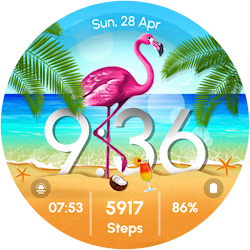
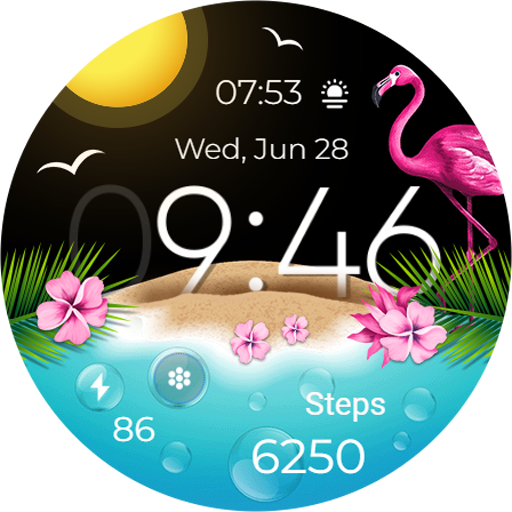
Summer Vacation Watch Face is a customizable watch face that captures the essence of the beach and vacation vibes. It features palm trees, dolphins, flamingos, and tropical parrot, all of which can be customized according to your vacation preferences. This watch face allows you to personalize it to your liking, bringing a touch of your favorite vacation memories right to your wrist.
Powered by Watch Face Format
⚙️ Phone App Features
The phone app is simply a tool to facilitate installation and locating the watch face on your Wear OS watch. Only the mobile app contains ads.
⚙️ Watch Face Features
• 12/24h Digital Time
• Date
• Battery
• Steps Count
• 1 customizable Shortcut
• 2 customizable Complications
• 3 Animals: Parrot, Dolphin, Flamingo
• Color Variations
• Always ON Display
🎨 Customization
1 - Touch and hold display
2 - Tap on Customize option
🎨 Complications
Touch and hold display to open customization mode. You can customize the field with any data you want.
🔋 Battery
For better battery performance of the watch, we recommend disabling the "Always On Display" mode.
✅ Compatible devices include API level 33+ Google Pixel, Galaxy Watch 4, 5, 6, 7 and other Wear OS models.
Installation and troubleshooting
Follow this link: https://www.recreative-watch.com/help/#installation-methodes
Watch faces don't automatically apply on your watch screen after the installation. That's why you must set it on your watch's screen.
💌 Write to support@recreative-watch.com for assistance.
Powered by Watch Face Format
⚙️ Phone App Features
The phone app is simply a tool to facilitate installation and locating the watch face on your Wear OS watch. Only the mobile app contains ads.
⚙️ Watch Face Features
• 12/24h Digital Time
• Date
• Battery
• Steps Count
• 1 customizable Shortcut
• 2 customizable Complications
• 3 Animals: Parrot, Dolphin, Flamingo
• Color Variations
• Always ON Display
🎨 Customization
1 - Touch and hold display
2 - Tap on Customize option
🎨 Complications
Touch and hold display to open customization mode. You can customize the field with any data you want.
🔋 Battery
For better battery performance of the watch, we recommend disabling the "Always On Display" mode.
✅ Compatible devices include API level 33+ Google Pixel, Galaxy Watch 4, 5, 6, 7 and other Wear OS models.
Installation and troubleshooting
Follow this link: https://www.recreative-watch.com/help/#installation-methodes
Watch faces don't automatically apply on your watch screen after the installation. That's why you must set it on your watch's screen.
💌 Write to support@recreative-watch.com for assistance.
Follow RECREATIVE Watch Faces — new faces in your inbox
One email per day at most — a single digest of yesterday's newly indexed watch faces from all developers you follow. Double opt-in, one-click unsubscribe, nothing else ever.
More from RECREATIVE Watch Faces