New Paid
Hybrid Weather Sport NTV596
Watchface for Wear OS 5+ API 34+ Galaxy Watch 4, 5, 6, 7, 8, Ultra, Google Pixel
Downloads100+
Total reviewsNo data available
Average scoreNo data available
Released on Google PlayOct 16, 2025
Last updated on Google PlayOct 16, 2025
DiscoveredJun 21, 2026
Last updatedAug 19, 2026
* Watch face Customize: Long press watch screen, press Customize:
- Cover: x 6 (above background)
- Hand color: x 10 (hour hand and minute hand colors, finally hide both hour and minute hands)
- Second hand: x 10 (second hand color, and finally hidden)
- Index: x 10 (Index colors and styles, and finally hidden)
- Digital BG: x 8 (background for Digital time area)
- Weather BG: x 10 (background for Weather area: default (first), the background will change automatically according to day and night: day is blue sky, night is starry sky, and the next wallpapers will not change day/night.)
- KM/Mile (change distance unit)
- Color: x 15
- Complication: x 8
+ 8 custom information display: humidity, uv index, feel like temp., sunset/sunrise, alarm, phone battery, world clock (**) ... (including 6 custom app shortcuts)
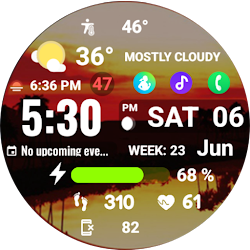
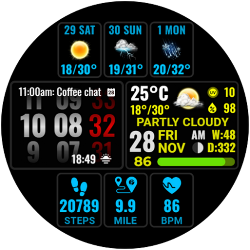
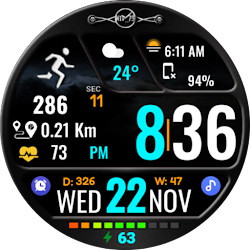
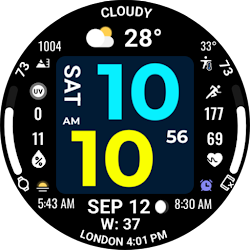
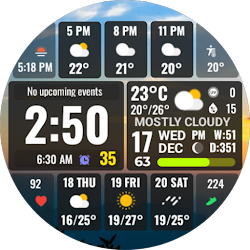
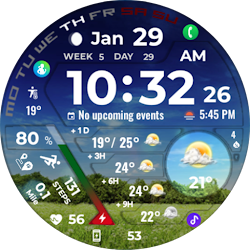
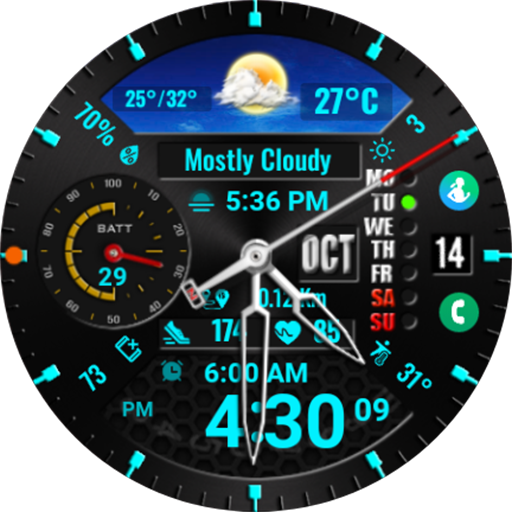
* Watch face Features: (*)
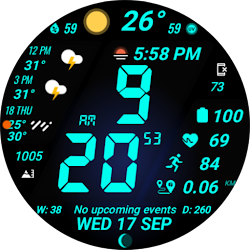
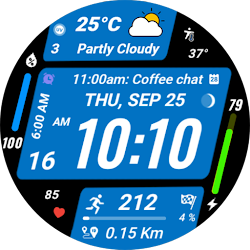
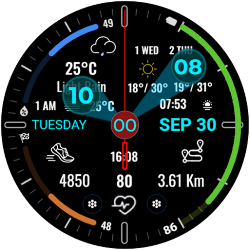
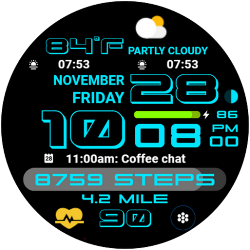
- Analog clock
- Digital clock (12H/24H)
- Day display
- Date display
- Month display
- Current weather icons (day and night icons change automatically in real time)
- Current weather temperature (C/F)
- Current low/hight temperature
- Current weather condition name
- Battery information display
- Step counts display
- Heart rate display
- Moved distance display (Km/Mile - change in Customize)
- AOD mode
...
(*) some features may not be available on some devices.
(**) Note:
+ To display the phone battery percentage, please install the Phone Battery Complication app on your phone, open it and follow the software instructions to install it on your watch. Then you can add it from the list when setting up Complication.
+ For more options for displaying weather information (humidity, uv index, air quality...) please open the Google store on your watch, search and install the application: Simple Weather and/or Google Weather (You will have more new options for Complication when Customize)
_____________
This is the Wear OS Watch Face app. It only supports smartwatch devices that work with WEAR OS 5+ API 34+.
_____________
📧 Any suggestions, questions, please email at: ntv579@gmail.com
___________________
Persionnalize your watch with Ntv Watchfaces!
+ Google Store: https://play.google.com/store/apps/dev?id=8003850771982135982
+ Coupon and share: https://t.me/NewWatchFaces
+ Telegram channel: https://t.me/NewWatchFacesLink
+ Watchface Reviews: https://t.me/wfreview
+ Fb Page: https://www.facebook.com/newwatchfaces
+ Instalgram: https://www.instagram.com/Ntv_79
+ YouTube: http://youtube.com/c/ntv79
Thanks all of you for always support me! ❤️
- Cover: x 6 (above background)
- Hand color: x 10 (hour hand and minute hand colors, finally hide both hour and minute hands)
- Second hand: x 10 (second hand color, and finally hidden)
- Index: x 10 (Index colors and styles, and finally hidden)
- Digital BG: x 8 (background for Digital time area)
- Weather BG: x 10 (background for Weather area: default (first), the background will change automatically according to day and night: day is blue sky, night is starry sky, and the next wallpapers will not change day/night.)
- KM/Mile (change distance unit)
- Color: x 15
- Complication: x 8
+ 8 custom information display: humidity, uv index, feel like temp., sunset/sunrise, alarm, phone battery, world clock (**) ... (including 6 custom app shortcuts)
* Watch face Features: (*)
- Analog clock
- Digital clock (12H/24H)
- Day display
- Date display
- Month display
- Current weather icons (day and night icons change automatically in real time)
- Current weather temperature (C/F)
- Current low/hight temperature
- Current weather condition name
- Battery information display
- Step counts display
- Heart rate display
- Moved distance display (Km/Mile - change in Customize)
- AOD mode
...
(*) some features may not be available on some devices.
(**) Note:
+ To display the phone battery percentage, please install the Phone Battery Complication app on your phone, open it and follow the software instructions to install it on your watch. Then you can add it from the list when setting up Complication.
+ For more options for displaying weather information (humidity, uv index, air quality...) please open the Google store on your watch, search and install the application: Simple Weather and/or Google Weather (You will have more new options for Complication when Customize)
_____________
This is the Wear OS Watch Face app. It only supports smartwatch devices that work with WEAR OS 5+ API 34+.
_____________
📧 Any suggestions, questions, please email at: ntv579@gmail.com
___________________
Persionnalize your watch with Ntv Watchfaces!
+ Google Store: https://play.google.com/store/apps/dev?id=8003850771982135982
+ Coupon and share: https://t.me/NewWatchFaces
+ Telegram channel: https://t.me/NewWatchFacesLink
+ Watchface Reviews: https://t.me/wfreview
+ Fb Page: https://www.facebook.com/newwatchfaces
+ Instalgram: https://www.instagram.com/Ntv_79
+ YouTube: http://youtube.com/c/ntv79
Thanks all of you for always support me! ❤️
Follow NTV Watchfaces — new faces in your inbox
One email per day at most — a single digest of yesterday's newly indexed watch faces from all developers you follow. Double opt-in, one-click unsubscribe, nothing else ever.
More from NTV Watchfaces