New Paid
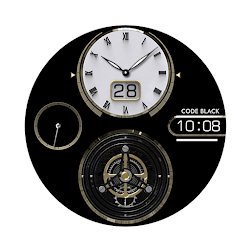
AWD Signature T watchface
by AIwatch
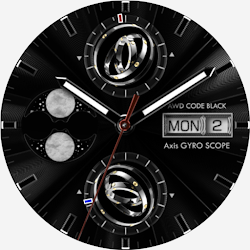
3D tourbillon watch face for Wear OS
Downloads100+
Total reviewsNo data available
Average scoreNo data available
Released on Google PlayMar 26, 2026
Last updated on Google PlayAug 5, 2026
DiscoveredJun 21, 2026
Last updatedAug 17, 2026
The second tourbillon version of the signature series
Elevate your Wear OS experience with the AWD Signature T.
Featuring a stunning, high-fidelity 3D animated tourbillon, this watch face brings the intricate heartbeat of traditional watchmaking to your wrist with fluid, realistic motion.
Features
• Moon phase
• Battery level
• Step percent
• Heart rate
• Condition of weather
• Temp
• 3D Tourbillon animation
• Day / Date
Customizing
Customization
• 8 Dial style change
• 4 Hands style change
• 3 App shortcut
- Support wear OS
- Square screen watch mode is not supported.
***Installation Guide***
The mobile app guides you through the watch face installation process.
You can delete the mobile app once the watch face installation is complete.
1. Your watch and phone must be connected via Bluetooth.
2. Tap the "Install" button in the mobile guide app.
3. Follow the instructions to install the watch face. It will take only a few minutes.
You can also search for and install watch faces directly from the Google app on your watch.
You can also search for and install watch faces from a mobile web browser.
Send feedback : aiwatchdesign@gmail.com
Elevate your Wear OS experience with the AWD Signature T.
Featuring a stunning, high-fidelity 3D animated tourbillon, this watch face brings the intricate heartbeat of traditional watchmaking to your wrist with fluid, realistic motion.
Features
• Moon phase
• Battery level
• Step percent
• Heart rate
• Condition of weather
• Temp
• 3D Tourbillon animation
• Day / Date
Customizing
Customization
• 8 Dial style change
• 4 Hands style change
• 3 App shortcut
- Support wear OS
- Square screen watch mode is not supported.
***Installation Guide***
The mobile app guides you through the watch face installation process.
You can delete the mobile app once the watch face installation is complete.
1. Your watch and phone must be connected via Bluetooth.
2. Tap the "Install" button in the mobile guide app.
3. Follow the instructions to install the watch face. It will take only a few minutes.
You can also search for and install watch faces directly from the Google app on your watch.
You can also search for and install watch faces from a mobile web browser.
Send feedback : aiwatchdesign@gmail.com
Follow AIwatch — new faces in your inbox
One email per day at most — a single digest of yesterday's newly indexed watch faces from all developers you follow. Double opt-in, one-click unsubscribe, nothing else ever.
More from AIwatch