New Paid
Material You Style Watch Face
by Gadget Liv
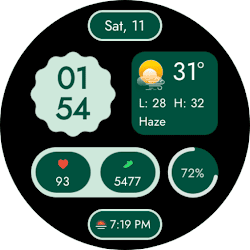
Material You-inspired watch face for Wear OS
Downloads500+
Total reviewsNo data available
Average scoreNo data available
Released on Google PlayMar 6, 2026
Last updated on Google PlayJul 31, 2026
DiscoveredJun 21, 2026
Last updatedAug 17, 2026
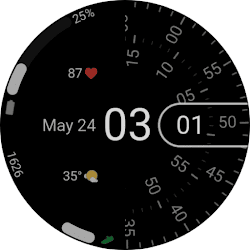
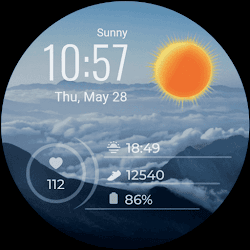
Upgrade your Wear OS smartwatch with a clean and modern digital watch face inspired by Material You design. This Material You Watch Face focuses on simplicity, soft colors, and a layout that feels calm and easy to read throughout the day.
✨ Key Features
- Material You styled watch face
- 5+ color palettes
- 2 editable complications
- Custom weather icons that change dynamically
- Customizable shape designs
- Minimal digital Always-On Display (AOD)
- 12-hour and 24-hour support
☀️ IMPORTANT: If the weather doesn't update:
1. Try switching between watch faces
2. Open the default 'Weather' app on your watch and enable location permission.
3. Ensure location access is set to "Always Allow" for both the watch face and the weather provider.
4. Check that Location (GPS) is toggled ON in both the watch and the paired smartphone settings.
5. Turn off Battery Power Saving mode to allow background data sync.
⚠️ Compatibility
This watch face is designed for smartwatches running Wear OS 5 or newer, built using the latest Watch Face Format.
Compatible devices include:
- Samsung Galaxy Watch Series (including Classic and Ultra models)
- Google Pixel Watch Series
- Other smartwatch brands running Wear OS 5 or newer
📩 Contact & Support
If you have any questions, issues, or feedback, feel free to contact me at gadgetliv@gmail.com or visit https://gadgetliv.com/contact
✨ Key Features
- Material You styled watch face
- 5+ color palettes
- 2 editable complications
- Custom weather icons that change dynamically
- Customizable shape designs
- Minimal digital Always-On Display (AOD)
- 12-hour and 24-hour support
☀️ IMPORTANT: If the weather doesn't update:
1. Try switching between watch faces
2. Open the default 'Weather' app on your watch and enable location permission.
3. Ensure location access is set to "Always Allow" for both the watch face and the weather provider.
4. Check that Location (GPS) is toggled ON in both the watch and the paired smartphone settings.
5. Turn off Battery Power Saving mode to allow background data sync.
⚠️ Compatibility
This watch face is designed for smartwatches running Wear OS 5 or newer, built using the latest Watch Face Format.
Compatible devices include:
- Samsung Galaxy Watch Series (including Classic and Ultra models)
- Google Pixel Watch Series
- Other smartwatch brands running Wear OS 5 or newer
📩 Contact & Support
If you have any questions, issues, or feedback, feel free to contact me at gadgetliv@gmail.com or visit https://gadgetliv.com/contact
Follow Gadget Liv — new faces in your inbox
One email per day at most — a single digest of yesterday's newly indexed watch faces from all developers you follow. Double opt-in, one-click unsubscribe, nothing else ever.
More from Gadget Liv