New Paid
S4U Tempest digital watch face
by styles4you
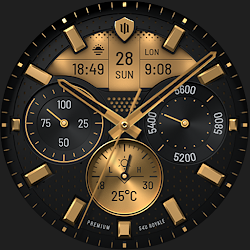
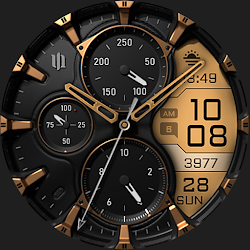
The S4U Tempest is an sporty digital watch face with many customization options.
Downloads1,000+
Total reviewsNo data available
Average scoreNo data available
Released on Google PlayJul 11, 2022
Last updated on Google PlayJul 29, 2025
DiscoveredJun 23, 2026
Last updatedAug 19, 2026
****
⚠️ IMPORTANT: Compatibility
This is a Wear OS Watch Face app and supports only smartwatches running Wear OS 4 or higher (Wear OS API 33+).
Compatible devices include:
- Samsung Galaxy Watch 4, 5, 6, 7, 7 Ultra, 8
- Google Pixel Watch 1–3
- Other Wear OS 5+ smartwatches
If you experience any issues with installation or downloading, even on a compatible smartwatch:
1. Open the companion app provided with your purchase.
2. Follow the steps in the Install/Issues section.
Still need help? Feel free to email me at wear@s4u-watches.com for support.
****
S4U Tempest is a sporty digital watch with many color customization options.
The dial shows the time, date (month, day of the month, weekday, week number), current battery status, distance walked (mile/km) and your heart rate.
In addition it's have 3 individual data container with exchangeable information (e.g. display for weather information, world time, sunrise/sunset, etc.).
There are a total of 10 colors. You are able to change 4 different areas on the watch to colorize. You can set up to 5 custom shortcuts to open your favorite watch app with just one click. For more information about the features, check out the gallery.
✨ Key Features:
- sporty digital watch face
- multiple color customization
- 3 individual data container (e.g. display for weather information, world time, sunrise/sunset, etc.)
- 5 individual shortcuts (reach your favorite app/widget with just one click)
🎨 CUSTOMIZATION OPTIONS
1. press and hold finger on the watch display.
2. press the button to adjust.
3. Swipe left or right to switch between the different customizable items.
4. Swipe up or down to change the options/color of the items.
Available color customization options:
- Background Color Top Left (10x) = color for the gradient in the top left corner
- Background Color Bottom Right (10x) = color for the gradient in the bottom right corner
- Color Turbine = Turbine Background Color
- Turbine Animation Design (6)
- Color Secondary
- "Color" (10x) = color of the following values: Time, Battery, Heart Rate, Day of the Week
- AOD Layout (2x)
- AOD Brightness (2x)
***
⚙️ COMPLICATIONS & SHORTCUTS
Enhance your watch face with customizable app shortcuts and complications:
- App Shortcuts: Link to your favorite widgets for quick access.
- Editable Complications: Display the data you need most by customizing the visible values.
1. press and hold the clock display.
2. press the customize button.
3. swipe from right to left until you reach the "complications".
4. 8 areas will be highlighted. 5 areas serve as a simple widget shortcut and 3 areas serves as a data container that can display different information such as weather, world clock, etc.
****
Additional option:
Single tap under the battery display to open the battery details widget.
****
📬 Stay Connected
If you enjoy this design, be sure to check out my other creations! I’m constantly working on new watch faces for Wear OS. Visit my website to explore more:
🌐 https://www.s4u-watches.com
Feedback & Support
I’d love to hear your thoughts! Whether it’s something you like, dislike, or a suggestion for future designs, your feedback helps me improve.
📧 For direct support, email me at: wear@s4u-watches.com
💬 Leave a review on the Play Store to share your experience!
Follow Me on Social Media
Stay up to date with my latest designs and updates:
📸 Instagram: https://www.instagram.com/matze_styles4you/
👍 Facebook: https://www.facebook.com/styles4you
▶️ YouTube: https://www.youtube.com/c/styles4you-watches
🐦 X: https://x.com/MStyles4you
⚠️ IMPORTANT: Compatibility
This is a Wear OS Watch Face app and supports only smartwatches running Wear OS 4 or higher (Wear OS API 33+).
Compatible devices include:
- Samsung Galaxy Watch 4, 5, 6, 7, 7 Ultra, 8
- Google Pixel Watch 1–3
- Other Wear OS 5+ smartwatches
If you experience any issues with installation or downloading, even on a compatible smartwatch:
1. Open the companion app provided with your purchase.
2. Follow the steps in the Install/Issues section.
Still need help? Feel free to email me at wear@s4u-watches.com for support.
****
S4U Tempest is a sporty digital watch with many color customization options.
The dial shows the time, date (month, day of the month, weekday, week number), current battery status, distance walked (mile/km) and your heart rate.
In addition it's have 3 individual data container with exchangeable information (e.g. display for weather information, world time, sunrise/sunset, etc.).
There are a total of 10 colors. You are able to change 4 different areas on the watch to colorize. You can set up to 5 custom shortcuts to open your favorite watch app with just one click. For more information about the features, check out the gallery.
✨ Key Features:
- sporty digital watch face
- multiple color customization
- 3 individual data container (e.g. display for weather information, world time, sunrise/sunset, etc.)
- 5 individual shortcuts (reach your favorite app/widget with just one click)
🎨 CUSTOMIZATION OPTIONS
1. press and hold finger on the watch display.
2. press the button to adjust.
3. Swipe left or right to switch between the different customizable items.
4. Swipe up or down to change the options/color of the items.
Available color customization options:
- Background Color Top Left (10x) = color for the gradient in the top left corner
- Background Color Bottom Right (10x) = color for the gradient in the bottom right corner
- Color Turbine = Turbine Background Color
- Turbine Animation Design (6)
- Color Secondary
- "Color" (10x) = color of the following values: Time, Battery, Heart Rate, Day of the Week
- AOD Layout (2x)
- AOD Brightness (2x)
***
⚙️ COMPLICATIONS & SHORTCUTS
Enhance your watch face with customizable app shortcuts and complications:
- App Shortcuts: Link to your favorite widgets for quick access.
- Editable Complications: Display the data you need most by customizing the visible values.
1. press and hold the clock display.
2. press the customize button.
3. swipe from right to left until you reach the "complications".
4. 8 areas will be highlighted. 5 areas serve as a simple widget shortcut and 3 areas serves as a data container that can display different information such as weather, world clock, etc.
****
Additional option:
Single tap under the battery display to open the battery details widget.
****
📬 Stay Connected
If you enjoy this design, be sure to check out my other creations! I’m constantly working on new watch faces for Wear OS. Visit my website to explore more:
🌐 https://www.s4u-watches.com
Feedback & Support
I’d love to hear your thoughts! Whether it’s something you like, dislike, or a suggestion for future designs, your feedback helps me improve.
📧 For direct support, email me at: wear@s4u-watches.com
💬 Leave a review on the Play Store to share your experience!
Follow Me on Social Media
Stay up to date with my latest designs and updates:
📸 Instagram: https://www.instagram.com/matze_styles4you/
👍 Facebook: https://www.facebook.com/styles4you
▶️ YouTube: https://www.youtube.com/c/styles4you-watches
🐦 X: https://x.com/MStyles4you
Follow styles4you — new faces in your inbox
One email per day at most — a single digest of yesterday's newly indexed watch faces from all developers you follow. Double opt-in, one-click unsubscribe, nothing else ever.
More from styles4you