New Free
Aesthetic Wildflower WF
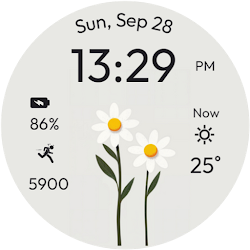
Aesthetic Wildflower Watch Face designed for ladies watch face.
Downloads10,000+
Total reviewsNo data available
Average scoreNo data available
Released on Google PlaySep 27, 2024
Last updated on Google PlayJul 25, 2026
DiscoveredJun 23, 2026
Last updatedAug 18, 2026
Introducing the Aesthetic Wildflower Watch Face for Wear OS, designed with elegance and grace just for ladies. This watch face brings a touch of nature’s beauty to your wrist, featuring delicate wildflower designs that complement your unique style.
Whether you're going for a casual day out or a special occasion, the Aesthetic Wildflower Watch Face adds a touch of sophistication and charm to your everyday look. Perfect for women who love blending functionality with feminine elegance.
⚙️ Watch Face Features
• Feminine and soft floral backgrounds
• Background Themes
• Date, month and day of the week.
• Heart Rate
• Battery %
• Steps Counter
• Color Variations
• Ambient Mode
• Always-on Display (AOD)
• Tap to measure heart rate
🔋 Battery
For better battery performance of the watch, we recommend disabling the "Always On Display" mode.
After installing the Aesthetic Wildflower Watch Face , follow these steps:
1.Open the Companion App on your phone.
2.Tap "Install on Watch".
3.On your watch, select the Aesthetic Wildflower Watch Face from your settings or watch face gallery.
Your watch face is now ready to use !
✅ Compatible with all Wear OS devices API 33+ including such as Google Pixel Watch, Samsung Galaxy Watch etc.
Not suitable for rectangular watches.
Thank you !
Whether you're going for a casual day out or a special occasion, the Aesthetic Wildflower Watch Face adds a touch of sophistication and charm to your everyday look. Perfect for women who love blending functionality with feminine elegance.
⚙️ Watch Face Features
• Feminine and soft floral backgrounds
• Background Themes
• Date, month and day of the week.
• Heart Rate
• Battery %
• Steps Counter
• Color Variations
• Ambient Mode
• Always-on Display (AOD)
• Tap to measure heart rate
🔋 Battery
For better battery performance of the watch, we recommend disabling the "Always On Display" mode.
After installing the Aesthetic Wildflower Watch Face , follow these steps:
1.Open the Companion App on your phone.
2.Tap "Install on Watch".
3.On your watch, select the Aesthetic Wildflower Watch Face from your settings or watch face gallery.
Your watch face is now ready to use !
✅ Compatible with all Wear OS devices API 33+ including such as Google Pixel Watch, Samsung Galaxy Watch etc.
Not suitable for rectangular watches.
Thank you !
Follow Filmmotion Studio — new faces in your inbox
One email per day at most — a single digest of yesterday's newly indexed watch faces from all developers you follow. Double opt-in, one-click unsubscribe, nothing else ever.
More from Filmmotion Studio