New Paid
CELEST5450 Smart Analog Watch
Sleek and elegant classic watch face from CELEST Watches
Downloads100+
Total reviewsNo data available
Average scoreNo data available
Released on Google PlayMay 24, 2023
Last updated on Google PlayAug 5, 2026
DiscoveredJun 30, 2026
Last updatedAug 18, 2026
A watch face from CELEST Watches to transform your Wear OS device with a stylish design that's a pleasure to wear.
ABOUT THIS DESIGN ↴
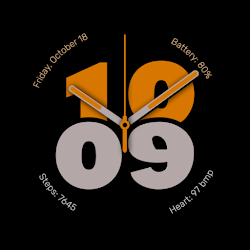
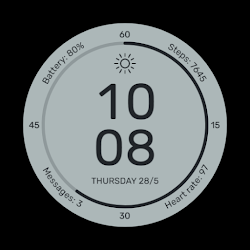
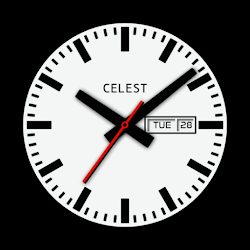
Embrace precision and style with this sophisticated 24-hour watch face. Inspired by the design of high-performance aviation instruments, this timepiece offers a clear and uncluttered display for precise timekeeping. The large, luminous numerals and bold hands ensure easy readability in any condition. Two sub-dials provide essential information at a glance, tracking your battery percentage and progress towards your daily step goal. The prominent date window and weekday display keep you informed throughout the day.
INSTALLATION GUIDE ↴
Having trouble installing your watch face from the Google Play Store? Follow these steps for a smooth setup:
✅ Watch Face Installed on Your Phone but Not on Your Watch?
This happens because the Play Store may install a companion app instead. To install directly on your watch:
1. Use the Play Store on Your Watch – Open Google Play on your smartwatch, search for the watch face name, and install it directly.
2. Use the Play Store Dropdown Menu – On your phone, tap the small triangular icon next to the "Install" button (https://i.imgur.com/boSIZ5k.png). Then, select your watch as the target device (https://i.imgur.com/HsZD0Xo.jpeg).
3. Try a Web Browser – Open the Play Store in a web browser on your PC, Mac, or laptop to manually select your watch (https://i.imgur.com/Rq6NGAC.png).
✅ Still Not Showing?
If the watch face doesn’t appear on your watch, open your watch's companion app on your phone (for Samsung devices, this is the Galaxy Wearable app):
- Navigate to the Downloaded section under watch faces.
- Find the watch face and tap to install it (https://i.imgur.com/Zi79PFr.png).
✅ Need More Help?
If you're still experiencing issues, contact us at info@celest-watches.com, and we'll help you resolve it quickly.
CUSTOMIZATION OPTIONS ↴
- 9 background color options
EXPLORE MORE & GET DISCOUNTS ↴
📌 Full Catalog: https://celest-watches.com/product-category/compatibility/wear-os/
📌 Exclusive Discounts for Wear OS: https://celest-watches.com/product-category/availability/on-sale-on-google-play/
STAY CONNECTED ↴
📸 Instagram: https://www.instagram.com/celestwatches/
📘 Facebook: https://www.facebook.com/celeswatchfaces
🐦 Twitter/X: https://twitter.com/CelestWatches
🎭 Threads: https://www.threads.net/@celestwatches
📌 Pinterest: https://pinterest.com/celestwatches/
🎵 TikTok: https://www.tiktok.com/@celestwatches
📝 Tumblr: https://www.tumblr.com/blog/celestwatches
📢 Telegram: https://t.me/celestwatcheswearos
🎁 Donate: https://buymeacoffee.com/celestwatches
ABOUT THIS DESIGN ↴
Embrace precision and style with this sophisticated 24-hour watch face. Inspired by the design of high-performance aviation instruments, this timepiece offers a clear and uncluttered display for precise timekeeping. The large, luminous numerals and bold hands ensure easy readability in any condition. Two sub-dials provide essential information at a glance, tracking your battery percentage and progress towards your daily step goal. The prominent date window and weekday display keep you informed throughout the day.
INSTALLATION GUIDE ↴
Having trouble installing your watch face from the Google Play Store? Follow these steps for a smooth setup:
✅ Watch Face Installed on Your Phone but Not on Your Watch?
This happens because the Play Store may install a companion app instead. To install directly on your watch:
1. Use the Play Store on Your Watch – Open Google Play on your smartwatch, search for the watch face name, and install it directly.
2. Use the Play Store Dropdown Menu – On your phone, tap the small triangular icon next to the "Install" button (https://i.imgur.com/boSIZ5k.png). Then, select your watch as the target device (https://i.imgur.com/HsZD0Xo.jpeg).
3. Try a Web Browser – Open the Play Store in a web browser on your PC, Mac, or laptop to manually select your watch (https://i.imgur.com/Rq6NGAC.png).
✅ Still Not Showing?
If the watch face doesn’t appear on your watch, open your watch's companion app on your phone (for Samsung devices, this is the Galaxy Wearable app):
- Navigate to the Downloaded section under watch faces.
- Find the watch face and tap to install it (https://i.imgur.com/Zi79PFr.png).
✅ Need More Help?
If you're still experiencing issues, contact us at info@celest-watches.com, and we'll help you resolve it quickly.
CUSTOMIZATION OPTIONS ↴
- 9 background color options
EXPLORE MORE & GET DISCOUNTS ↴
📌 Full Catalog: https://celest-watches.com/product-category/compatibility/wear-os/
📌 Exclusive Discounts for Wear OS: https://celest-watches.com/product-category/availability/on-sale-on-google-play/
STAY CONNECTED ↴
📸 Instagram: https://www.instagram.com/celestwatches/
📘 Facebook: https://www.facebook.com/celeswatchfaces
🐦 Twitter/X: https://twitter.com/CelestWatches
🎭 Threads: https://www.threads.net/@celestwatches
📌 Pinterest: https://pinterest.com/celestwatches/
🎵 TikTok: https://www.tiktok.com/@celestwatches
📝 Tumblr: https://www.tumblr.com/blog/celestwatches
📢 Telegram: https://t.me/celestwatcheswearos
🎁 Donate: https://buymeacoffee.com/celestwatches
Follow CELEST Watches — new faces in your inbox
One email per day at most — a single digest of yesterday's newly indexed watch faces from all developers you follow. Double opt-in, one-click unsubscribe, nothing else ever.
More from CELEST Watches