New Paid
CELEST5491 Sport Watch
Sleek and elegant classic watch face from CELEST Watches
Downloads100+
Total reviewsNo data available
Average scoreNo data available
Released on Google PlayDec 28, 2023
Last updated on Google PlayAug 5, 2026
DiscoveredJun 30, 2026
Last updatedAug 19, 2026
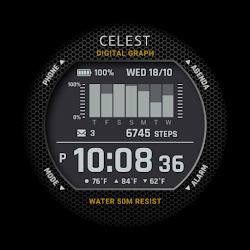
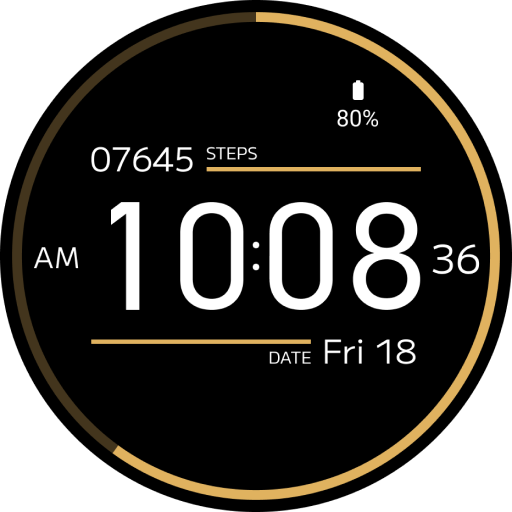
Upgrade your smartwatch with a sleek minimalist design – a clean black background and large, easy-to-read white numerals make timekeeping effortless. The default configuration keeps you informed with essential details like steps, date, and battery level at a quick glance. Customize your experience with six placements for complications, three on top and three on the bottom, ready for your favorite apps and data. Pick your vibe with nine accent color options, ensuring the watch face matches your style. Elevate your wristwear with this simple yet stylish smartwatch upgrade that's both functional and easy on the eyes.
INSTALLATION GUIDE ↴
When attempting to install a watch face from the official Google Play Android app, you may encounter several issues.
In cases where the watch face is installed on your phone but not on your watch, the developer has included a companion app to enhance visibility on the Play Store. You can uninstall the companion app from your phone and look for a triangular symbol next to the Install button in the Play Store app (https://i.imgur.com/OqWHNYf.png). This symbol indicates a dropdown menu, where you can pick your watch as the target for installation.
Alternatively you can try to open the Play Store in a web browser on your laptop, Mac or PC. This will enable you to visually select the correct device for installation (https://i.imgur.com/Rq6NGAC.png).
[Samsung] If you followed the aforementioned instructions and the watch face still doesn't appear on your watch, open the Galaxy Wearable app. Navigate to the Downloaded section within the app, and you'll find the watch face there (https://i.imgur.com/mmNusLy.png). Simply click on it to initiate the installation.
WATCH FACE DETAILS ↴
Complications:
- Steps
- Date
- 6 complication placements
Color variants:
- 9 bright accent colors
CATALOG & DISCOUNTS↴
Our online catalog: https://celest-watches.com/product-category/compatibility/wear-os/
Wear OS discounts: https://celest-watches.com/product-category/availability/on-sale-on-google-play/
FOLLOW US ↴
Instagram: https://www.instagram.com/celestwatches/
Facebook: https://www.facebook.com/celeswatchfaces
Twitter: https://twitter.com/CelestWatches
Telegram: https://t.me/celestwatcheswearos
INSTALLATION GUIDE ↴
When attempting to install a watch face from the official Google Play Android app, you may encounter several issues.
In cases where the watch face is installed on your phone but not on your watch, the developer has included a companion app to enhance visibility on the Play Store. You can uninstall the companion app from your phone and look for a triangular symbol next to the Install button in the Play Store app (https://i.imgur.com/OqWHNYf.png). This symbol indicates a dropdown menu, where you can pick your watch as the target for installation.
Alternatively you can try to open the Play Store in a web browser on your laptop, Mac or PC. This will enable you to visually select the correct device for installation (https://i.imgur.com/Rq6NGAC.png).
[Samsung] If you followed the aforementioned instructions and the watch face still doesn't appear on your watch, open the Galaxy Wearable app. Navigate to the Downloaded section within the app, and you'll find the watch face there (https://i.imgur.com/mmNusLy.png). Simply click on it to initiate the installation.
WATCH FACE DETAILS ↴
Complications:
- Steps
- Date
- 6 complication placements
Color variants:
- 9 bright accent colors
CATALOG & DISCOUNTS↴
Our online catalog: https://celest-watches.com/product-category/compatibility/wear-os/
Wear OS discounts: https://celest-watches.com/product-category/availability/on-sale-on-google-play/
FOLLOW US ↴
Instagram: https://www.instagram.com/celestwatches/
Facebook: https://www.facebook.com/celeswatchfaces
Twitter: https://twitter.com/CelestWatches
Telegram: https://t.me/celestwatcheswearos
Follow CELEST Watches — new faces in your inbox
One email per day at most — a single digest of yesterday's newly indexed watch faces from all developers you follow. Double opt-in, one-click unsubscribe, nothing else ever.
More from CELEST Watches