New Paid
CELEST5593 Retro Digital Watch
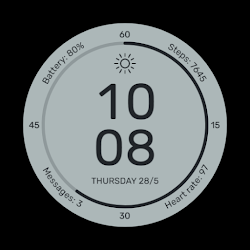
Retro digital watch face with weather, date, battery info and smart shortcuts
Downloads500+
Total reviewsNo data available
Average scoreNo data available
Released on Google PlayOct 12, 2025
Last updated on Google PlayAug 5, 2026
DiscoveredJun 30, 2026
Last updatedAug 17, 2026
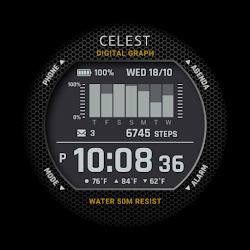
This watch face blends the rugged charm of vintage segmented displays with the convenience of modern smartwatch features. Large, high-contrast digits make the time easy to read, with automatic switching between 12-hour mode with AM/PM and 24-hour format based on your phone settings. Seconds are shown both in a dedicated counter and through the animated outer ring of markers, while the date can be displayed in either U.S. (MM-DD) or European (DD-MM) format. The battery level and weather icon are always visible at a glance, creating a clean layout that feels both functional and familiar.
Everyday use is effortless thanks to built-in tap interactions: the battery icon opens battery details, the date links to your calendar, the weather icon shows the forecast and the ALM icon takes you directly to your alarms. With 30 color variations available, you can easily match the design to your style, your watch body or your mood, making this face a perfect balance of retro appeal and smart versatility.
⚡ KEY FEATURES
· Shortcuts to Battery, Calendar, Weather and Alarms
· 30 color combinations
· No customizable complications
· One invisible complication slot above the weather icon to set up a shortcut to the weather app.
📱 COMPATIBILITY
✅ Wear OS 5+ required (for weather functions)
✅ Works with Galaxy Watch, Pixel Watch, and all Wear OS 5+ devices
🔧 INSTALLATION HELP
Having trouble? We've got you covered:
- Use the dropdown menu next to "Install" on your phone to select your watch model or install directly from your watch's Play Store app
- Updating weather data may take time after installation but switching to another watch face and switching back or restarting both the watch and phone usually helps
- Check out our installation and troubleshooting guide: https://celest-watches.com/installation-troubleshooting/
- Contact us at info@celest-watches.com for quick support
🏪 DISCOVER MORE
Browse our full collection of premium Wear OS watch faces:
🔗 https://celest-watches.com
💰 Exclusive discounts available
📞 SUPPORT & COMMUNITY
📧 Support: info@celest-watches.com
📱 Follow @celestwatches on Instagram or sign up to our newsletter!
Everyday use is effortless thanks to built-in tap interactions: the battery icon opens battery details, the date links to your calendar, the weather icon shows the forecast and the ALM icon takes you directly to your alarms. With 30 color variations available, you can easily match the design to your style, your watch body or your mood, making this face a perfect balance of retro appeal and smart versatility.
⚡ KEY FEATURES
· Shortcuts to Battery, Calendar, Weather and Alarms
· 30 color combinations
· No customizable complications
· One invisible complication slot above the weather icon to set up a shortcut to the weather app.
📱 COMPATIBILITY
✅ Wear OS 5+ required (for weather functions)
✅ Works with Galaxy Watch, Pixel Watch, and all Wear OS 5+ devices
🔧 INSTALLATION HELP
Having trouble? We've got you covered:
- Use the dropdown menu next to "Install" on your phone to select your watch model or install directly from your watch's Play Store app
- Updating weather data may take time after installation but switching to another watch face and switching back or restarting both the watch and phone usually helps
- Check out our installation and troubleshooting guide: https://celest-watches.com/installation-troubleshooting/
- Contact us at info@celest-watches.com for quick support
🏪 DISCOVER MORE
Browse our full collection of premium Wear OS watch faces:
🔗 https://celest-watches.com
💰 Exclusive discounts available
📞 SUPPORT & COMMUNITY
📧 Support: info@celest-watches.com
📱 Follow @celestwatches on Instagram or sign up to our newsletter!
Follow CELEST Watches — new faces in your inbox
One email per day at most — a single digest of yesterday's newly indexed watch faces from all developers you follow. Double opt-in, one-click unsubscribe, nothing else ever.
More from CELEST Watches