New Paid
MKW DIGITAL Dashboard
MKW digital dashboard watch face for Wear OS and Galaxy Watch
Downloads500+
Total reviewsNo data available
Average scoreNo data available
Released on Google PlayFeb 16, 2026
Last updated on Google PlayMay 7, 2026
DiscoveredJun 25, 2026
Last updatedAug 20, 2026
MKW Digital Dashboard Watch Face | Data Style for Wear OS
Important Notice
This watch face is supported on Wear OS Watch devices running One UI 6.0 or higher.
This application is designed exclusively for smartwatches.
Users without a compatible smartwatch will not be able to use the watch face after purchase.
Watch Face Features
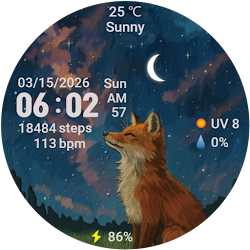
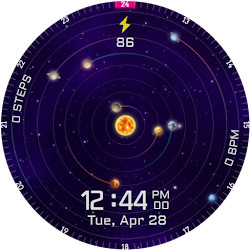
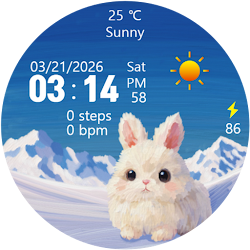
• Digital dashboard design with clean data-style layout
• Chance of Rain Gauge
• UV Index Gauge
• Weather Forecast (Today / +1 / +2 Days)
• Temperature Forecast (Today / +1 / +2 Days)
• Sunrise / Sunset Time
• Moon Phase Display
• Step Counter & Percent
• Heart Rate Monitor
• Battery Status
Temperature Mode
• Supports Celsius (°C) and Fahrenheit (°F)
• The gauge and temperature value change automatically depending on whether the temperature is above or below zero.
Language Support
• English
• Korean
• French
• Spanish
• German
Complication
• Editable complication supported
• Default provider: Next Event
Tap Actions
• Phone
• Message
• Alarm
• Settings
• Heart Rate
MKW Installation Guide
The “MKW Installation Guide” app is a companion application that helps install the watch face on Wear OS devices.
MKW products include a smartphone companion app, and the “MKW Installation Guide” supports Wear OS watch face downloads only.
Usage Notes
• Heart rate information is displayed based on data measured by the watch’s heart rate application.
• Weather data may vary depending on the connected provider.
Community & Support
• Blog: https://excing4860.tistory.com/
• Email: excing4860@naver.com
Important Notice
This watch face is supported on Wear OS Watch devices running One UI 6.0 or higher.
This application is designed exclusively for smartwatches.
Users without a compatible smartwatch will not be able to use the watch face after purchase.
Watch Face Features
• Digital dashboard design with clean data-style layout
• Chance of Rain Gauge
• UV Index Gauge
• Weather Forecast (Today / +1 / +2 Days)
• Temperature Forecast (Today / +1 / +2 Days)
• Sunrise / Sunset Time
• Moon Phase Display
• Step Counter & Percent
• Heart Rate Monitor
• Battery Status
Temperature Mode
• Supports Celsius (°C) and Fahrenheit (°F)
• The gauge and temperature value change automatically depending on whether the temperature is above or below zero.
Language Support
• English
• Korean
• French
• Spanish
• German
Complication
• Editable complication supported
• Default provider: Next Event
Tap Actions
• Phone
• Message
• Alarm
• Settings
• Heart Rate
MKW Installation Guide
The “MKW Installation Guide” app is a companion application that helps install the watch face on Wear OS devices.
MKW products include a smartphone companion app, and the “MKW Installation Guide” supports Wear OS watch face downloads only.
Usage Notes
• Heart rate information is displayed based on data measured by the watch’s heart rate application.
• Weather data may vary depending on the connected provider.
Community & Support
• Blog: https://excing4860.tistory.com/
• Email: excing4860@naver.com
Follow MKW(Mystic Kindle Watch) — new faces in your inbox
One email per day at most — a single digest of yesterday's newly indexed watch faces from all developers you follow. Double opt-in, one-click unsubscribe, nothing else ever.
More from MKW(Mystic Kindle Watch)