New Free
AMOLED Digital Watch Face
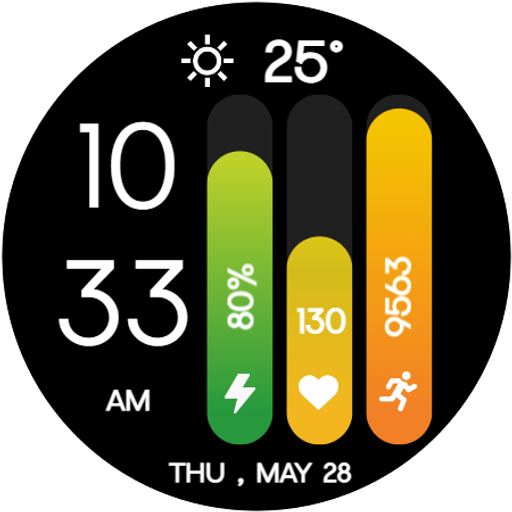
Clean AMOLED digital watch face with battery, heart rate, and step bars.
Downloads1,000+
Total reviewsNo data available
Average scoreNo data available
Released on Google PlayMay 9, 2026
Last updated on Google PlayJul 24, 2026
DiscoveredJun 28, 2026
Last updatedAug 19, 2026
Maximize your smartwatch battery life and sleek style with the AMOLED Digital Watch Face—a modern, data-rich digital watch face for Wear OS. Featuring a pure black background and vibrant vertical progress bars, this watch face perfectly blends energy-efficient design with essential daily fitness tracking at a single, effortless glance.
🔋 Perfect For: Power users, minimalists, fitness enthusiasts, and anyone who wants a clean, highly legible, and battery-saving digital watch face.
🎉 Ideal for All Occasions : Whether you're tracking an intense workout, working at the office, or looking to extend your watch's battery life over a long weekend, this bold, color-coded design adds a modern and highly functional touch to your everyday style.
✨ Key Features:
★ True Black AMOLED Design : A deep, pure black background that not only looks incredibly sleek but actively saves battery life on AMOLED smartwatch displays by turning off unused pixels.
★ Vibrant Progress Bars : Instantly read your most important data through three bold, color-coded vertical bars elegantly tracking your Battery Percentage, Heart Rate, and Steps.
★ Large Digital Display : An ultra-clean, vertically stacked digital time layout that ensures maximum readability in absolutely any lighting condition.
★ Optimized for smooth, reliable, and exceptionally battery-efficient performance on all modern Wear OS devices.
⚙️ Phone App Features :
★ The mobile app acts as a companion tool to help easily install and locate the watch face on your Wear OS smartwatch.
⚙️ Watch Face Features :
★ Large 12/24h Vertical Digital Time
★ Bottom-Centered Date & Day Display
★ Dynamic Battery Level Progress Bar (%)
★ Dynamic Heart Rate Progress Bar (BPM)
★ Dynamic Step Counter Progress Bar
★ Top-Center Weather Complication
★ Pure Black AMOLED-Friendly Background
★ Always-On Display (AOD) Support
📲 Installation Instructions :
1. Open the Companion App on your phone.
2. Tap "Install on Watch." On your watch, select AMOLED Digital Watch Face from your settings or gallery.
✅ Compatibility :
★ Works seamlessly with all Wear OS devices (API 33+), including Google Pixel Watch & Samsung Galaxy Watch.
★ ❌ Not suitable for rectangular watches.
★ Track your progress and save your battery in style. Upgrade to the sleek, modern AMOLED Digital Watch Face today! ⌚🔋
🔋 Perfect For: Power users, minimalists, fitness enthusiasts, and anyone who wants a clean, highly legible, and battery-saving digital watch face.
🎉 Ideal for All Occasions : Whether you're tracking an intense workout, working at the office, or looking to extend your watch's battery life over a long weekend, this bold, color-coded design adds a modern and highly functional touch to your everyday style.
✨ Key Features:
★ True Black AMOLED Design : A deep, pure black background that not only looks incredibly sleek but actively saves battery life on AMOLED smartwatch displays by turning off unused pixels.
★ Vibrant Progress Bars : Instantly read your most important data through three bold, color-coded vertical bars elegantly tracking your Battery Percentage, Heart Rate, and Steps.
★ Large Digital Display : An ultra-clean, vertically stacked digital time layout that ensures maximum readability in absolutely any lighting condition.
★ Optimized for smooth, reliable, and exceptionally battery-efficient performance on all modern Wear OS devices.
⚙️ Phone App Features :
★ The mobile app acts as a companion tool to help easily install and locate the watch face on your Wear OS smartwatch.
⚙️ Watch Face Features :
★ Large 12/24h Vertical Digital Time
★ Bottom-Centered Date & Day Display
★ Dynamic Battery Level Progress Bar (%)
★ Dynamic Heart Rate Progress Bar (BPM)
★ Dynamic Step Counter Progress Bar
★ Top-Center Weather Complication
★ Pure Black AMOLED-Friendly Background
★ Always-On Display (AOD) Support
📲 Installation Instructions :
1. Open the Companion App on your phone.
2. Tap "Install on Watch." On your watch, select AMOLED Digital Watch Face from your settings or gallery.
✅ Compatibility :
★ Works seamlessly with all Wear OS devices (API 33+), including Google Pixel Watch & Samsung Galaxy Watch.
★ ❌ Not suitable for rectangular watches.
★ Track your progress and save your battery in style. Upgrade to the sleek, modern AMOLED Digital Watch Face today! ⌚🔋
Follow Shagun Clock Watch Faces — new faces in your inbox
One email per day at most — a single digest of yesterday's newly indexed watch faces from all developers you follow. Double opt-in, one-click unsubscribe, nothing else ever.
More from Shagun Clock Watch Faces