New Paid
MD338 Hybrid watch face
by Matteo Dini MD ® Watch Faces
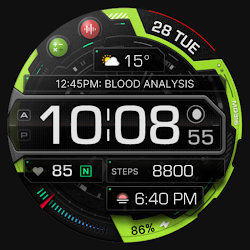
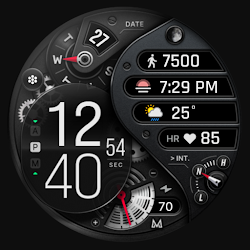
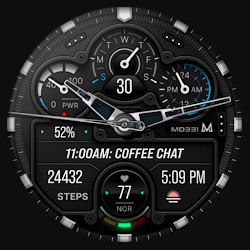
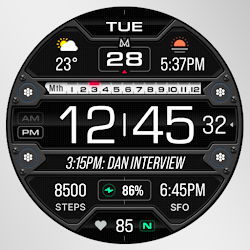
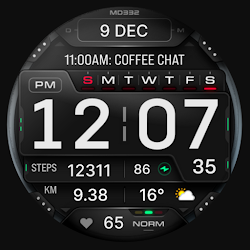
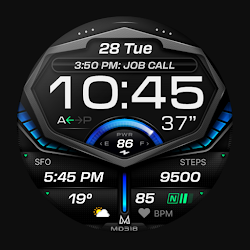
Highly customizable hybrid watch face for Wear OS, perfect for everyday use.
Downloads10,000+
Total reviewsNo data available
Average scoreNo data available
Released on Google PlayJul 21, 2024
Last updated on Google PlayAug 24, 2025
DiscoveredJun 20, 2026
Last updatedAug 17, 2026
New watch face format.
Note for Galaxy Watch Users: The watch face editor in the Samsung Wearable app often fails to load complex watch faces like this one.
This is not an issue with the watch face itself.
It is recommended to customize the watch face directly on the watch until Samsung resolves this issue.
TAP AND HOLD SCREEN ON WATCH AND SELECT CUSTOMIZE.
This advanced watch face adheres to the latest watch face format required by Google Play.
Key Features:
- 4 Preset App Shortcuts and 1 Customizable Shortcut.
- 4 Customizable Complications: Display your preferred data such as weather, barometer, distance walked, calories, UV index, chance of rain, and more.
- Up to 1 Million Color Combinations: Personalize the watch face with an extensive range of color options.
Device Compatibility:
This watch face supports all Wear OS devices with API Level 33+ (Wear OS 4 and later versions) like Samsung Galaxy Watch 4-8, Ultra, Pixel Watch etc.
Features at a Glance:
- 12/24hr Format: Syncs with your phone settings.
- Hybrid Design
- Date and Months Display
- Battery and Heart Rate Monitoring
- 4 Preset App Shortcuts:
- Calendar
- Battery
- Measure Heart Rate
- Set Alarm
- 1 Customizable Shortcut
- 4 Customizable Complications
- 9 Sets of Hands
- Steps and Daily Step Goals
- Customizable Colors: LCD, arrows, theme, and general colors.
- Always On Display Mode: Minimal and full modes available.
- Hideable Hands
Customization:
1. Touch and hold the screen on your watch.
2. Tap on the 'customize' option to personalize your watch face.
Watch Face Complications:
Customize up to 4 complications with data such as weather, health metrics (calories, distance walked), world clock, barometer, and more.
To obtain data from "complications" such as distance, bitcoin and more, it will be necessary to install additional complications if they are not already available on your watch.
Note: Complications are external apps, and we have no control over them.
Support:
For support or to learn how to install additional complications, contact us at: support@mdwatchfaces.com
Some features may not be available on all watches.
Stay Connected:
Newsletter:
Sign up to stay updated with new watchfaces and promotions.
http://eepurl.com/hlRcvf
FACEBOOK:
https://www.facebook.com/matteodiniwatchfaces
INSTAGRAM:
https://www.instagram.com/mdwatchfaces/
TELEGRAM:
https://t.me/mdwatchfaces
WEB:
https://www.matteodinimd.com
Thank you!
Note for Galaxy Watch Users: The watch face editor in the Samsung Wearable app often fails to load complex watch faces like this one.
This is not an issue with the watch face itself.
It is recommended to customize the watch face directly on the watch until Samsung resolves this issue.
TAP AND HOLD SCREEN ON WATCH AND SELECT CUSTOMIZE.
This advanced watch face adheres to the latest watch face format required by Google Play.
Key Features:
- 4 Preset App Shortcuts and 1 Customizable Shortcut.
- 4 Customizable Complications: Display your preferred data such as weather, barometer, distance walked, calories, UV index, chance of rain, and more.
- Up to 1 Million Color Combinations: Personalize the watch face with an extensive range of color options.
Device Compatibility:
This watch face supports all Wear OS devices with API Level 33+ (Wear OS 4 and later versions) like Samsung Galaxy Watch 4-8, Ultra, Pixel Watch etc.
Features at a Glance:
- 12/24hr Format: Syncs with your phone settings.
- Hybrid Design
- Date and Months Display
- Battery and Heart Rate Monitoring
- 4 Preset App Shortcuts:
- Calendar
- Battery
- Measure Heart Rate
- Set Alarm
- 1 Customizable Shortcut
- 4 Customizable Complications
- 9 Sets of Hands
- Steps and Daily Step Goals
- Customizable Colors: LCD, arrows, theme, and general colors.
- Always On Display Mode: Minimal and full modes available.
- Hideable Hands
Customization:
1. Touch and hold the screen on your watch.
2. Tap on the 'customize' option to personalize your watch face.
Watch Face Complications:
Customize up to 4 complications with data such as weather, health metrics (calories, distance walked), world clock, barometer, and more.
To obtain data from "complications" such as distance, bitcoin and more, it will be necessary to install additional complications if they are not already available on your watch.
Note: Complications are external apps, and we have no control over them.
Support:
For support or to learn how to install additional complications, contact us at: support@mdwatchfaces.com
Some features may not be available on all watches.
Stay Connected:
Newsletter:
Sign up to stay updated with new watchfaces and promotions.
http://eepurl.com/hlRcvf
FACEBOOK:
https://www.facebook.com/matteodiniwatchfaces
INSTAGRAM:
https://www.instagram.com/mdwatchfaces/
TELEGRAM:
https://t.me/mdwatchfaces
WEB:
https://www.matteodinimd.com
Thank you!
Follow Matteo Dini MD ® Watch Faces — new faces in your inbox
One email per day at most — a single digest of yesterday's newly indexed watch faces from all developers you follow. Double opt-in, one-click unsubscribe, nothing else ever.
More from Matteo Dini MD ® Watch Faces