New Paid
Ballozi ASTIG Hybrid Analog
Modern military analog stealth watch face for Wear OS from Ballozi
Downloads1,000+
Total reviewsNo data available
Average scoreNo data available
Released on Google PlayApr 19, 2022
Last updated on Google PlayMar 24, 2026
DiscoveredJul 11, 2026
Last updatedAug 17, 2026
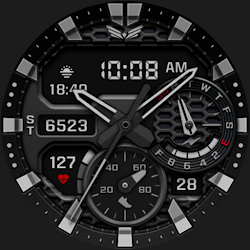
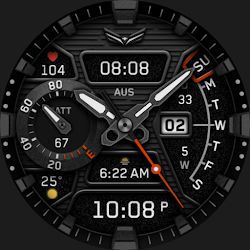
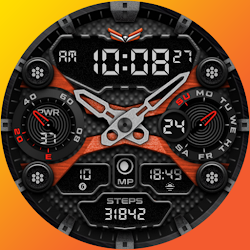
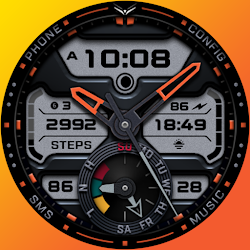
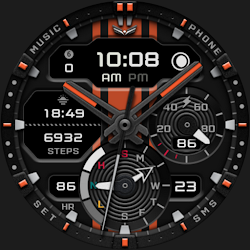
BALLOZI ASTIG is a modern military stealth-style analog watch face for Wear OS. It works great on round smartwatches but is not suitable for rectangular and square watches.
FEATURES:
- Digital clock switchable to 24h/12h via Phone Settings
- Steps counter with progress subdial
- Battery, date, and day of week subdial
- Moon phase type
- 2x Watch hand (light gray & dark)
- 5x Backgrounds
- 6x Subdial colors
- 23x Theme colors
- 2x Editable Complication
- 4x Preset app shortcuts
- 4x Customizable app shortcuts
CUSTOMIZATION:
(Please refer to phone screenshot #3.)
1. Press and hold "Display" then hit "Customize."
2. Swipe left and right to choose what to customize.
3. Swipe up and down to choose options available.
4. Hit "OK."
PRESET APP SHORTCUTS
1. Alarm
2. Calendar
3. Battery Status
CUSTOMIZABLE APP SHORTCUTS
1. Press & hold display then Customize
3. Find Complication, and single tap to set the preferred app in the shortcuts.
Check out Ballozi's updates at:
Telegram group: https://t.me/Ballozi_Watch_Faces
Facebook page: https://www.facebook.com/ballozi.watchfaces/
Instagram: https://www.instagram.com/ballozi.watchfaces/
Youtube Channel: https://www.youtube.com/channel/UCkY2oGwe1Ava5J5ruuIoQAg
Pinterest: https://www.pinterest.ph/ballozi/
For support and requests, you can email me at balloziwatchface@gmail.com
FEATURES:
- Digital clock switchable to 24h/12h via Phone Settings
- Steps counter with progress subdial
- Battery, date, and day of week subdial
- Moon phase type
- 2x Watch hand (light gray & dark)
- 5x Backgrounds
- 6x Subdial colors
- 23x Theme colors
- 2x Editable Complication
- 4x Preset app shortcuts
- 4x Customizable app shortcuts
CUSTOMIZATION:
(Please refer to phone screenshot #3.)
1. Press and hold "Display" then hit "Customize."
2. Swipe left and right to choose what to customize.
3. Swipe up and down to choose options available.
4. Hit "OK."
PRESET APP SHORTCUTS
1. Alarm
2. Calendar
3. Battery Status
CUSTOMIZABLE APP SHORTCUTS
1. Press & hold display then Customize
3. Find Complication, and single tap to set the preferred app in the shortcuts.
Check out Ballozi's updates at:
Telegram group: https://t.me/Ballozi_Watch_Faces
Facebook page: https://www.facebook.com/ballozi.watchfaces/
Instagram: https://www.instagram.com/ballozi.watchfaces/
Youtube Channel: https://www.youtube.com/channel/UCkY2oGwe1Ava5J5ruuIoQAg
Pinterest: https://www.pinterest.ph/ballozi/
For support and requests, you can email me at balloziwatchface@gmail.com
Follow BALLOZI Watch Faces — new faces in your inbox
One email per day at most — a single digest of yesterday's newly indexed watch faces from all developers you follow. Double opt-in, one-click unsubscribe, nothing else ever.
More from BALLOZI Watch Faces