New Paid
Key WF66 Beautiful Beach Watch
Key WF66 is a Digital Watch Face with Classic Design for Wear OS
Downloads100+
Total reviewsNo data available
Average scoreNo data available
Released on Google PlayJan 25, 2025
Last updated on Google PlayOct 15, 2025
DiscoveredJul 21, 2026
Last updatedAug 17, 2026
Buy One Get One, BOGO Promotion :
1. Buy any of our Watch Faces
2. Send email to syauqiyhidayah@gmail.com
3. Attach RECEIPT from Google to the email
4. Wait for the Coupon
5. You can not choose the free WF
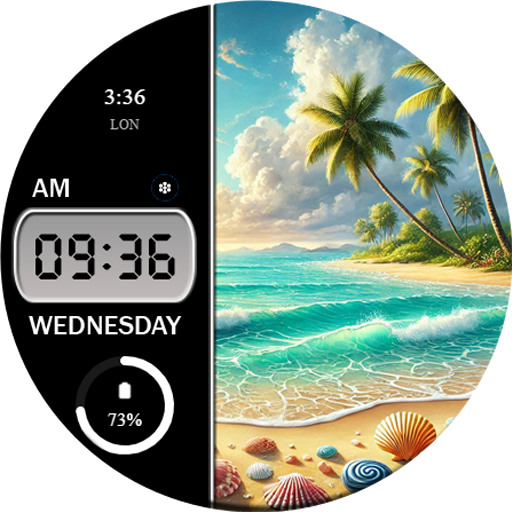
Key WF66 is a Digital Watch Face with Classic Design for Wear OS. Key WF66 features a beautiful beach scene. There are many beach scene background styles that you can choose from. You can also change the background style of the digital clock.
Features
- 12/24H digital time format
- Day Name Information
- Have Background Style
- Custom Shortcuts
- 2 short circle complications.
IMPORTANT!
This is a Wear OS Watch Face app. This app only supports smartwatch devices running with WEAR OS
AOD:
Displays digital clock information while saving battery power.
Color adjustments:
1. Press and hold your finger at center on the watch display.
2. Press the button to adjust.
3. Swipe left or right to switch between the different customizable items.
4. Swipe up or down to change the options/color of the items.
1. Buy any of our Watch Faces
2. Send email to syauqiyhidayah@gmail.com
3. Attach RECEIPT from Google to the email
4. Wait for the Coupon
5. You can not choose the free WF
Key WF66 is a Digital Watch Face with Classic Design for Wear OS. Key WF66 features a beautiful beach scene. There are many beach scene background styles that you can choose from. You can also change the background style of the digital clock.
Features
- 12/24H digital time format
- Day Name Information
- Have Background Style
- Custom Shortcuts
- 2 short circle complications.
IMPORTANT!
This is a Wear OS Watch Face app. This app only supports smartwatch devices running with WEAR OS
AOD:
Displays digital clock information while saving battery power.
Color adjustments:
1. Press and hold your finger at center on the watch display.
2. Press the button to adjust.
3. Swipe left or right to switch between the different customizable items.
4. Swipe up or down to change the options/color of the items.
Follow Key Watch Face — new faces in your inbox
One email per day at most — a single digest of yesterday's newly indexed watch faces from all developers you follow. Double opt-in, one-click unsubscribe, nothing else ever.
More from Key Watch Face