New Paid
GMT Zone Watch Face
by RichFace
A GMT watch face with crypto complication for WearOS smartwatches
Downloads1,000+
Total reviewsNo data available
Average scoreNo data available
Released on Google PlayDec 3, 2022
Last updated on Google PlayOct 4, 2024
DiscoveredAug 5, 2026
Last updatedAug 16, 2026
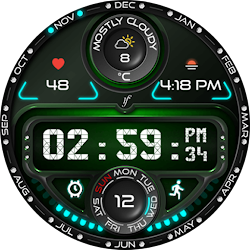
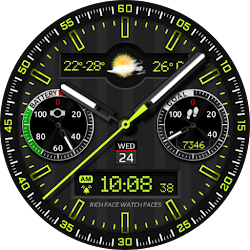
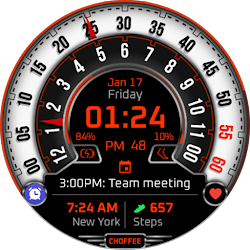
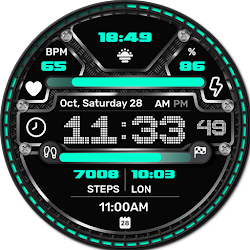
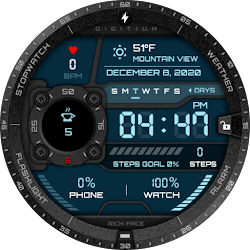
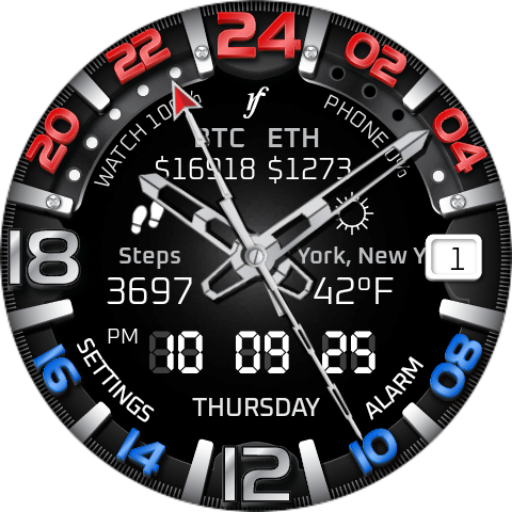
Introducing the GMT Zone watch face! This sleek and stylish watch face is perfect for the jet-setting individual. With its ability to display an additional time zone, you'll never be late for a meeting again. Whether you're in New York, London, or Tokyo, the GMT Zone has you covered.
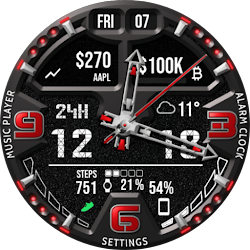
Get yours today and stay on time, no matter where you are in the world! Also, we created a new Crypto complication for those who likes to check cryptos frequently.
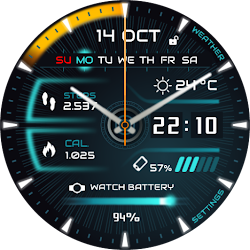
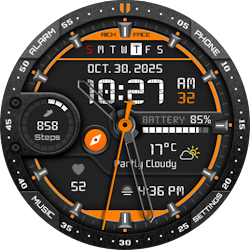
In addition to our built-in complications, including steps, weather, heart rate, and a coffee and water counter, we've also added a new crypto complication for those who like to keep track of their favorite coins.
Our new crypto complication allows you to select and track one of favorite coin right on the watch face. You can also customize the update frequency in the settings.
This watch face supports only WearOS by Google.
NOT SUPPORTED: Samsung S2/S3/Watch on Tizen OS, Huawei Watch GT/GT2, Xiaomi Amazfit GTS, Xiaomi Pace, Xiaomi Bip, and other watches.
★ Built-in Complications ★
• ★ NEW! Crypto complication ★
• Steps (Built-in steps)
• Weather
• Heart Rate
• Coffee and Water counter
• External complication (The user selects which data sources they want in the complication)
★ Options ★
• ★ Crypto complication ★
• Vibrate every hour
• Beep sound on every hour
• Auto HeartRate monitor
• Forecast (5 days)
• Change color
• 24-hour format
• Leading zero
• Screen time
• Forecast
• Full ambient mode option
• Change color preset on tap
• Tap indicator
• Weather settings (location, providers, frequency update, units)
• Bezel shortcuts:
• Alarm
• Settings
• Find phone
• Stopwatch
• Map *(Google Map needs to be installed on the smartwatch)
• Flashlight
• Timer
★ NEW Crypto Complication ★
The complication gives you a option to select 2 crypto coins and watch them on top position. In the settings, user is able to select frequent update.
★ Wear OS 3.0 support!
• Fully standalone! (iPhone and Android compatible)
• External complication data for the indicators
★ Device sensor complications:
• Heart Rate monitor complication
• Built-in Steps counter complication
★ FAQ
★ How to select a complication in the desired position ★
- Long tap on the watch face
- System shows the icon "gear" for the watch face settings. Tap on it.
- Select the "Customize" option
- Select "Complications" option
- Select the desired position
- Select built-in complication or
- Select External Complication
• Select any third-party complication
You are ready to go.
Q: Do your watch faces support Samsung Active 4 and Samsung Active 4 Classic?
A: Yes, our watch faces support WearOS smartwatches.
Q: How to install the watch face?
A: Follow these steps:
1. Open the Google Play Store app on your watch
2. Search for the watch face
3. Press the install button
Q: I bought the app on my phone, do I have to buy it again for my watch?
A: You should not have to buy it again. Sometimes the Play Store takes a bit longer to figure out that you already bought the app. Any additional order will automatically be refunded by Google, you will receive the money back.
★★★ DISCLAIMER: ★★★
The watch face is standalone app but the complication for phone battery requires a connection with the companion app on Android phone devices. iPhone users can not have this data due to iOS limitation.
★ Other FAQ find here:
https://richface.watch/faq
!! Please contact us if you have any trouble with the app !!
richface.watch@gmail.com
★ PERMISSIONS Explained
https://www.richface.watch/privacy
Get yours today and stay on time, no matter where you are in the world! Also, we created a new Crypto complication for those who likes to check cryptos frequently.
In addition to our built-in complications, including steps, weather, heart rate, and a coffee and water counter, we've also added a new crypto complication for those who like to keep track of their favorite coins.
Our new crypto complication allows you to select and track one of favorite coin right on the watch face. You can also customize the update frequency in the settings.
This watch face supports only WearOS by Google.
NOT SUPPORTED: Samsung S2/S3/Watch on Tizen OS, Huawei Watch GT/GT2, Xiaomi Amazfit GTS, Xiaomi Pace, Xiaomi Bip, and other watches.
★ Built-in Complications ★
• ★ NEW! Crypto complication ★
• Steps (Built-in steps)
• Weather
• Heart Rate
• Coffee and Water counter
• External complication (The user selects which data sources they want in the complication)
★ Options ★
• ★ Crypto complication ★
• Vibrate every hour
• Beep sound on every hour
• Auto HeartRate monitor
• Forecast (5 days)
• Change color
• 24-hour format
• Leading zero
• Screen time
• Forecast
• Full ambient mode option
• Change color preset on tap
• Tap indicator
• Weather settings (location, providers, frequency update, units)
• Bezel shortcuts:
• Alarm
• Settings
• Find phone
• Stopwatch
• Map *(Google Map needs to be installed on the smartwatch)
• Flashlight
• Timer
★ NEW Crypto Complication ★
The complication gives you a option to select 2 crypto coins and watch them on top position. In the settings, user is able to select frequent update.
★ Wear OS 3.0 support!
• Fully standalone! (iPhone and Android compatible)
• External complication data for the indicators
★ Device sensor complications:
• Heart Rate monitor complication
• Built-in Steps counter complication
★ FAQ
★ How to select a complication in the desired position ★
- Long tap on the watch face
- System shows the icon "gear" for the watch face settings. Tap on it.
- Select the "Customize" option
- Select "Complications" option
- Select the desired position
- Select built-in complication or
- Select External Complication
• Select any third-party complication
You are ready to go.
Q: Do your watch faces support Samsung Active 4 and Samsung Active 4 Classic?
A: Yes, our watch faces support WearOS smartwatches.
Q: How to install the watch face?
A: Follow these steps:
1. Open the Google Play Store app on your watch
2. Search for the watch face
3. Press the install button
Q: I bought the app on my phone, do I have to buy it again for my watch?
A: You should not have to buy it again. Sometimes the Play Store takes a bit longer to figure out that you already bought the app. Any additional order will automatically be refunded by Google, you will receive the money back.
★★★ DISCLAIMER: ★★★
The watch face is standalone app but the complication for phone battery requires a connection with the companion app on Android phone devices. iPhone users can not have this data due to iOS limitation.
★ Other FAQ find here:
https://richface.watch/faq
!! Please contact us if you have any trouble with the app !!
richface.watch@gmail.com
★ PERMISSIONS Explained
https://www.richface.watch/privacy
Follow RichFace — new faces in your inbox
One email per day at most — a single digest of yesterday's newly indexed watch faces from all developers you follow. Double opt-in, one-click unsubscribe, nothing else ever.
More from RichFace