New Free
RoverOne Watch Face
by RichFace
Watch face with analog and digital complications for Wear OS smartwatches
Downloads100,000+
Total reviews731
Average score★ 4.13
Released on Google PlayApr 26, 2018
Last updated on Google PlayOct 9, 2024
DiscoveredJul 13, 2026
Last updatedAug 19, 2026
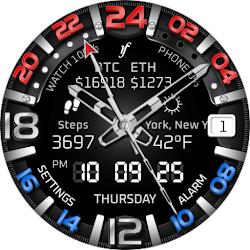
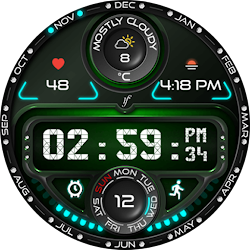
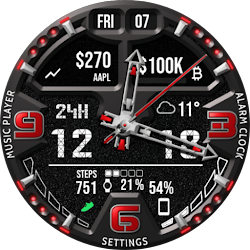
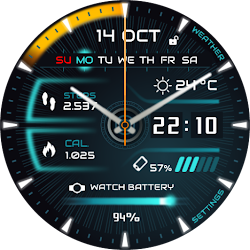
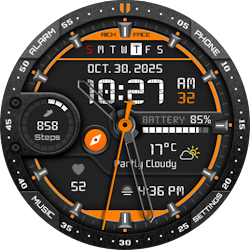
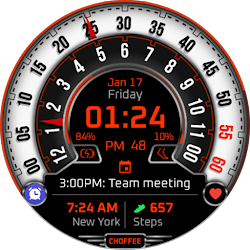
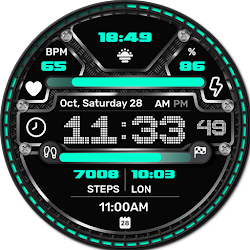
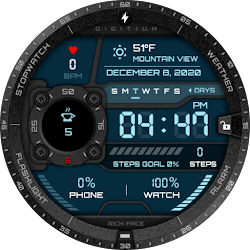
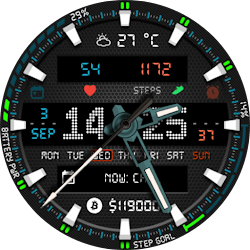
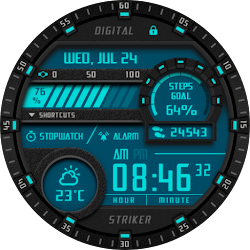
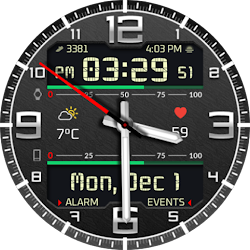
Watch Face RoverOne for Wear OS is true eye-catcher with digital characteristics and interactive functions.
Watch face contains a huge number and user friendly settings on the watch and the phone companion app.
The Wear OS comes with external complication which this watch face supports completely.
★ Watch Face RoverOne is fully Wear OS supported
★ WEAR OS 2.0 integration
• Fully standalone! (iPhone and Android compatible)
• External complication data for the indicators
★ Compatible with all Wear OS watches
★ Free version
Complications:
• Phone battery
• Date
Options:
• Change color
• 24 hour format
• Leading zero
• Screen time
★ NEW option for paid version ★
• Vibrate on every hour
★ Paid version
Built-in complications
• Alarm shortcut
• Steps
• Distance
• Walking
• Running
• Biking
• Calories
• Fit statistics
• Water counter
• Coffee counter
Options:
• External complications
• Change color
• 24 hour format
• Leading zero
• Screen time
• Forecast
• Full ambient mode option
• Change color preset on tap
• Tap indicator
• Google FIT integration
• Weather settings (location, providers, frequency update, units)
★ DISCLAIMER ★
The free version doesn't have a tap functionality. It just shows data and the user is not able to change it until unlock the PREMIUM version.
★ FAQ
!! Please contact us if you have any trouble with the app !!
richface.watch@gmail.com
How do I install the watch face on Wear OS ?
1. Install it from Google Play Store on your Wear OS smartwatch.
2. Install the companion app for fully customization (Android phone devices).
★ PERMISSIONS Explained
https://richface.watch/privacy
Watch face contains a huge number and user friendly settings on the watch and the phone companion app.
The Wear OS comes with external complication which this watch face supports completely.
★ Watch Face RoverOne is fully Wear OS supported
★ WEAR OS 2.0 integration
• Fully standalone! (iPhone and Android compatible)
• External complication data for the indicators
★ Compatible with all Wear OS watches
★ Free version
Complications:
• Phone battery
• Date
Options:
• Change color
• 24 hour format
• Leading zero
• Screen time
★ NEW option for paid version ★
• Vibrate on every hour
★ Paid version
Built-in complications
• Alarm shortcut
• Steps
• Distance
• Walking
• Running
• Biking
• Calories
• Fit statistics
• Water counter
• Coffee counter
Options:
• External complications
• Change color
• 24 hour format
• Leading zero
• Screen time
• Forecast
• Full ambient mode option
• Change color preset on tap
• Tap indicator
• Google FIT integration
• Weather settings (location, providers, frequency update, units)
★ DISCLAIMER ★
The free version doesn't have a tap functionality. It just shows data and the user is not able to change it until unlock the PREMIUM version.
★ FAQ
!! Please contact us if you have any trouble with the app !!
richface.watch@gmail.com
How do I install the watch face on Wear OS ?
1. Install it from Google Play Store on your Wear OS smartwatch.
2. Install the companion app for fully customization (Android phone devices).
★ PERMISSIONS Explained
https://richface.watch/privacy
Follow RichFace — new faces in your inbox
One email per day at most — a single digest of yesterday's newly indexed watch faces from all developers you follow. Double opt-in, one-click unsubscribe, nothing else ever.
More from RichFace