New Paid
GRBL Nothing Weather 5
by Grubel
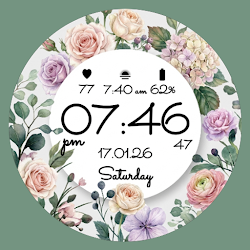
Modern watch face with custom weather icons Designed for Wear OS
Downloads50+
Total reviewsNo data available
Average scoreNo data available
Released on Google PlayNov 1, 2025
Last updated on Google PlayNov 1, 2025
DiscoveredJun 21, 2026
Last updatedAug 14, 2026
Nothing OS Inspired Watch Face for Wear OS
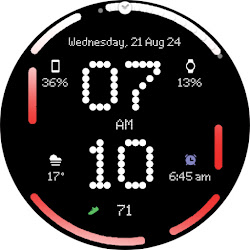
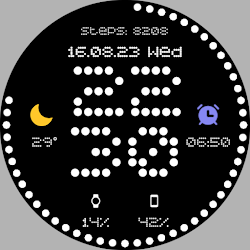
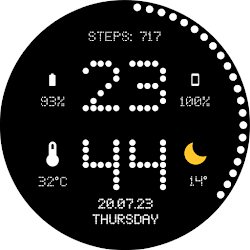
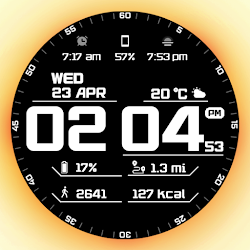
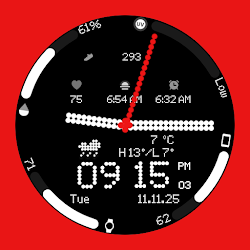
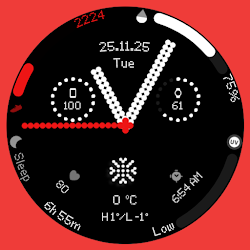
Upgrade your Wear OS smartwatch with a sleek, minimalistic watch face inspired by Nothing OS. Perfectly designed to blend style and functionality, it gives you quick access to time, date, weather, and custom complications.
Why You’ll Love It:
✅ Elegant AM/PM & 12H/24H time formats
✅ 7 fully customizable complications
✅ 11 unique weather icons for instant forecasts
✅ Date adapts automatically to your locale
✅ Always-On Display (AOD) with theme-matching colors
✅ 16 eye-catching themes to match your style
Your watch must be running Android 14 or higher
Quick Tips for Weather Complications:
Update weather manually after installing.
If it doesn’t appear, switch to another watch face and back.
Fahrenheit users: initial sync may show high temperatures; it updates automatically.
Installation Made Simple:
From your Play Store app:
Select your watch from the drop-down menu and install.
Long press your watch screen → swipe left → tap ‘ADD WATCH FACE’ to activate.
From your Play Store website:
Open the watch face listing on your PC/Mac browser.
Click “Install on more devices” → choose your watch.
Long press your watch screen → swipe left → tap ‘ADD WATCH FACE’ to activate.
📹 Samsung Developers video with installation tips: Watch Here
Note:
The companion app opens the Play Store listing only; it does not install the watch face automatically.
For phone battery status on your watch, install the Phone Battery Complication app.
Custom complications may vary by third-party apps.
Need Help?
Email us at grubel.watchfaces@gmail.com
Upgrade your Wear OS smartwatch with a sleek, minimalistic watch face inspired by Nothing OS. Perfectly designed to blend style and functionality, it gives you quick access to time, date, weather, and custom complications.
Why You’ll Love It:
✅ Elegant AM/PM & 12H/24H time formats
✅ 7 fully customizable complications
✅ 11 unique weather icons for instant forecasts
✅ Date adapts automatically to your locale
✅ Always-On Display (AOD) with theme-matching colors
✅ 16 eye-catching themes to match your style
Your watch must be running Android 14 or higher
Quick Tips for Weather Complications:
Update weather manually after installing.
If it doesn’t appear, switch to another watch face and back.
Fahrenheit users: initial sync may show high temperatures; it updates automatically.
Installation Made Simple:
From your Play Store app:
Select your watch from the drop-down menu and install.
Long press your watch screen → swipe left → tap ‘ADD WATCH FACE’ to activate.
From your Play Store website:
Open the watch face listing on your PC/Mac browser.
Click “Install on more devices” → choose your watch.
Long press your watch screen → swipe left → tap ‘ADD WATCH FACE’ to activate.
📹 Samsung Developers video with installation tips: Watch Here
Note:
The companion app opens the Play Store listing only; it does not install the watch face automatically.
For phone battery status on your watch, install the Phone Battery Complication app.
Custom complications may vary by third-party apps.
Need Help?
Email us at grubel.watchfaces@gmail.com
Follow Grubel — new faces in your inbox
One email per day at most — a single digest of yesterday's newly indexed watch faces from all developers you follow. Double opt-in, one-click unsubscribe, nothing else ever.
More from Grubel