New Paid
NW130KR: Tennis Champions
Sports watch faces for tennis enthusiasts. Check your steps, heart rate, weather, and probability of precipitation right on your wrist.
Downloads1+
Total reviewsNo data available
Average scoreNo data available
Released on Google Play–
Last updated on Google PlayJul 30, 2026
DiscoveredJun 21, 2026
Last updatedAug 18, 2026
The ultimate tennis watch face for Wear OS, NW130KR (Korean exclusive)!
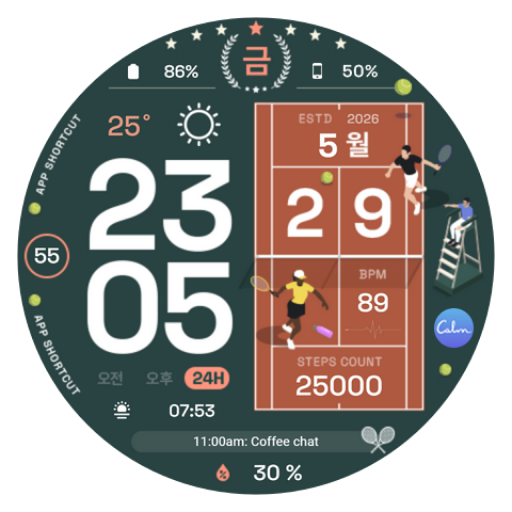
Meet the 'Tennis Champion' edition, designed for passionate tennis players and sports enthusiasts. It captures the dynamic vibe of the court in one device, combined with essential smart features.
✅ Pro Tournament Style Design
Recreates iconic court environments from tennis tournaments around the world in 15 premium colors.
🔹 Classic Grass Court (Green): A sophisticated style with a traditional and dignified mood.
🔹 Passionate Clay Court (Orange): An intense contrast theme capturing the burning passion on the court.
🔹 Modern Hard Court (Blue): Excellent visibility delivering the precision and crispness of a professional match.
🔹 Unique Court Visibility: Stylish background options such as Purple and Rose Gold to express your individuality.
✅ Fitness & Activity Tracker
Brings the essence of a sports watch to life with precise data displays that boost workout efficiency. 🔹 Real-time Heart Rate (BPM) Measurement: Instantly monitor your physical condition even during intense rallies.
🔹 Steps Count: Track your daily activity and fitness goal achievement.
🔹 Highly Readable Digital Layout: Time display visible at a glance, even amidst dynamic movements on the court.
✅ Weather Intelligence for Outdoor Matches
Provides real-time weather data optimized for outdoor activities.
🔹 Current Weather Conditions and Temperature: Real-time checks to determine if the conditions are optimal for a match.
🔹 Precipitation Probability: Rain forecasts to ensure you are fully prepared for sudden rain and match delays.
🔹 Custom Complications: Freely rearrange data slots to display the most essential information.
✅ Powerful Personalization Settings
🔹 15 Theme Colors: Freely change colors to match your tennis uniform or mood for the day.
🔹 5 User Widgets (Complications): Customize the location of frequently checked information. 🔹 7 App Shortcuts: Instantly access workouts and frequently used apps with a single touch.
⚙️ [Easy] How to Install Watch Faces
If automatic download does not occur, please install it using one of the methods below.
🔸 Install via Smartphone App: Open the Companion app downloaded on your smartphone and tap the 'Install on Watch' button.
🔸 Install via Mobile Store: Check (V) your watch in the 'Select Device' or 'Available Devices' menu at the top of the Play Store, then install it.
🔸 Install via Web Browser (Recommended): Access the Play Store via a web browser on your PC or phone, select your watch in the 'Select Device' menu, and install it remotely.
🔸 Search Directly on Watch: Launch the Play Store on your smartwatch, search for 'NW130', and download it.
📌 Confirm Installation: Press and hold the watch screen for 2–3 seconds, then select the installed face from the 'Add Watch Face (+)' menu on the far right. 📌 Download Delay: Depending on Google server conditions, it may take 5 to 10 minutes. If installation is delayed, you can use Method 3 (Web Browser) or Method 4 (Searching directly on the watch) to install it immediately without waiting.
⚠️ Precautions and Setup Guide
🔹 Time Format: 12-hour/24-hour modes automatically synchronize with the system settings of the connected smartphone.
🔹 Complication Settings: Please refer to the screenshot examples on the app details page for instructions on how to place individual widgets.
🔹 Smartphone Battery Display: To synchronize phone battery levels, you must install the 'Phone Battery Complication (Free)' app from the Google Play Store on both your phone and watch.
📱 Community & Customer Support
🔹 Instagram: https://www.instagram.com/9ine.watchface/
🔹 Customer Inquiries: For usage inquiries, error reports, or development inquiries, please send an email to the address below, and we will respond promptly. 🔹 Email: 9inewatch@gmail.com
*This watch face supports Wear OS devices.
Meet the 'Tennis Champion' edition, designed for passionate tennis players and sports enthusiasts. It captures the dynamic vibe of the court in one device, combined with essential smart features.
✅ Pro Tournament Style Design
Recreates iconic court environments from tennis tournaments around the world in 15 premium colors.
🔹 Classic Grass Court (Green): A sophisticated style with a traditional and dignified mood.
🔹 Passionate Clay Court (Orange): An intense contrast theme capturing the burning passion on the court.
🔹 Modern Hard Court (Blue): Excellent visibility delivering the precision and crispness of a professional match.
🔹 Unique Court Visibility: Stylish background options such as Purple and Rose Gold to express your individuality.
✅ Fitness & Activity Tracker
Brings the essence of a sports watch to life with precise data displays that boost workout efficiency. 🔹 Real-time Heart Rate (BPM) Measurement: Instantly monitor your physical condition even during intense rallies.
🔹 Steps Count: Track your daily activity and fitness goal achievement.
🔹 Highly Readable Digital Layout: Time display visible at a glance, even amidst dynamic movements on the court.
✅ Weather Intelligence for Outdoor Matches
Provides real-time weather data optimized for outdoor activities.
🔹 Current Weather Conditions and Temperature: Real-time checks to determine if the conditions are optimal for a match.
🔹 Precipitation Probability: Rain forecasts to ensure you are fully prepared for sudden rain and match delays.
🔹 Custom Complications: Freely rearrange data slots to display the most essential information.
✅ Powerful Personalization Settings
🔹 15 Theme Colors: Freely change colors to match your tennis uniform or mood for the day.
🔹 5 User Widgets (Complications): Customize the location of frequently checked information. 🔹 7 App Shortcuts: Instantly access workouts and frequently used apps with a single touch.
⚙️ [Easy] How to Install Watch Faces
If automatic download does not occur, please install it using one of the methods below.
🔸 Install via Smartphone App: Open the Companion app downloaded on your smartphone and tap the 'Install on Watch' button.
🔸 Install via Mobile Store: Check (V) your watch in the 'Select Device' or 'Available Devices' menu at the top of the Play Store, then install it.
🔸 Install via Web Browser (Recommended): Access the Play Store via a web browser on your PC or phone, select your watch in the 'Select Device' menu, and install it remotely.
🔸 Search Directly on Watch: Launch the Play Store on your smartwatch, search for 'NW130', and download it.
📌 Confirm Installation: Press and hold the watch screen for 2–3 seconds, then select the installed face from the 'Add Watch Face (+)' menu on the far right. 📌 Download Delay: Depending on Google server conditions, it may take 5 to 10 minutes. If installation is delayed, you can use Method 3 (Web Browser) or Method 4 (Searching directly on the watch) to install it immediately without waiting.
⚠️ Precautions and Setup Guide
🔹 Time Format: 12-hour/24-hour modes automatically synchronize with the system settings of the connected smartphone.
🔹 Complication Settings: Please refer to the screenshot examples on the app details page for instructions on how to place individual widgets.
🔹 Smartphone Battery Display: To synchronize phone battery levels, you must install the 'Phone Battery Complication (Free)' app from the Google Play Store on both your phone and watch.
📱 Community & Customer Support
🔹 Instagram: https://www.instagram.com/9ine.watchface/
🔹 Customer Inquiries: For usage inquiries, error reports, or development inquiries, please send an email to the address below, and we will respond promptly. 🔹 Email: 9inewatch@gmail.com
*This watch face supports Wear OS devices.
Follow 9INE watchfaces — new faces in your inbox
One email per day at most — a single digest of yesterday's newly indexed watch faces from all developers you follow. Double opt-in, one-click unsubscribe, nothing else ever.
More from 9INE watchfaces