New Paid
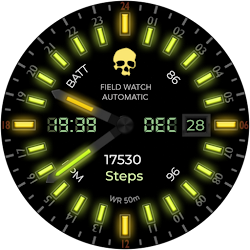
Field Watch 2 Wear OS 5+
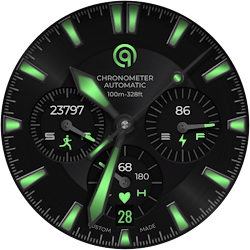
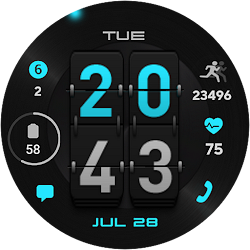
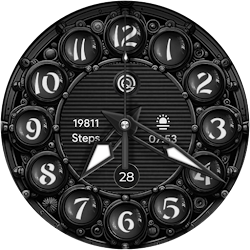
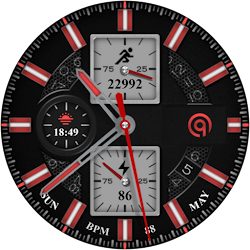
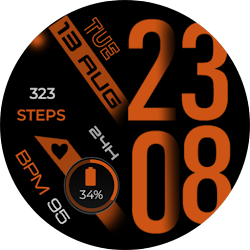
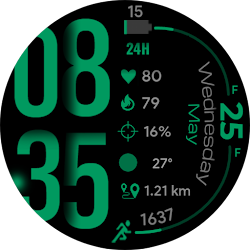
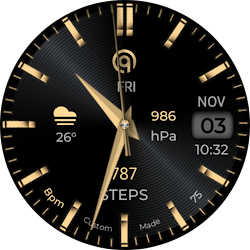
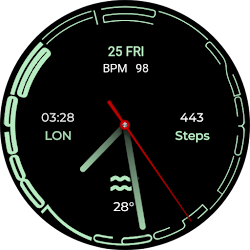
A field watchface for wear os with black background and color customizations
Downloads1,000+
Total reviewsNo data available
Average scoreNo data available
Released on Google PlayMay 21, 2023
Last updated on Google PlayJul 29, 2026
DiscoveredJun 22, 2026
Last updatedAug 20, 2026
======================================================
FEATURES AND FUNCTIONS
======================================================
Guide:-
1. Complications Slots:-
This watch face works with Wear OS Toolset Data Builder Component App very well.Maximize your complication slots. Use the Data Builder in Wear OS Tool set to stack multiple data points into a single space on this watch face ,Create custom own text complications components.
link
https://play.google.com/store/apps/details?id=com.gs.complications.suite
2. Installation Methods
Use this link if you don't know how to install or having problems in Installation. Copy it and read official Install Guide Showing 3 x methods that work 100 percent to install the watch face properly.
Link
https://developer.samsung.com/sdp/blog/en-us/2022/11/15/install-watch-faces-for-galaxy-watch5-and-one-ui-watch-45
=======================================================
FEATURES AND FUNCTIONS
=======================================================
This watch face for WEAR OS 5+ has following features:-
1. Tap on 12 o clock hour number to open watch Google Maps app.
2. Tap on 6 o clock hour number to open watch Google Play Store App.
3. Tap on 10 o clock hour number to open watch music app.
4. Tap on 3 o clock hour number to open watch dial app.
5. Tap on 9 o clock hour number to open watch messages app.
6. Tap on 8 o clock hour number to open watch Battery app.
7. Tap on Date or Day Text to open watch Calendar app.
8. Tap on 4 o clock hour number to open watch Alarm app.
9. Tap on 2 o clock hour number to open watch settings app.
10. Seconds Movement style selection option is also available in customization menu.
11. You can switch colors on/off for 24 hour index inner circle numbers for main or AoD display separately via customization menu.
12. You can switch colors on/off for 12 hour main index inner circle numbers via customization menu.
13. Dim Mode is also available via customization menu for both Main and AoD separately.
FEATURES AND FUNCTIONS
======================================================
Guide:-
1. Complications Slots:-
This watch face works with Wear OS Toolset Data Builder Component App very well.Maximize your complication slots. Use the Data Builder in Wear OS Tool set to stack multiple data points into a single space on this watch face ,Create custom own text complications components.
link
https://play.google.com/store/apps/details?id=com.gs.complications.suite
2. Installation Methods
Use this link if you don't know how to install or having problems in Installation. Copy it and read official Install Guide Showing 3 x methods that work 100 percent to install the watch face properly.
Link
https://developer.samsung.com/sdp/blog/en-us/2022/11/15/install-watch-faces-for-galaxy-watch5-and-one-ui-watch-45
=======================================================
FEATURES AND FUNCTIONS
=======================================================
This watch face for WEAR OS 5+ has following features:-
1. Tap on 12 o clock hour number to open watch Google Maps app.
2. Tap on 6 o clock hour number to open watch Google Play Store App.
3. Tap on 10 o clock hour number to open watch music app.
4. Tap on 3 o clock hour number to open watch dial app.
5. Tap on 9 o clock hour number to open watch messages app.
6. Tap on 8 o clock hour number to open watch Battery app.
7. Tap on Date or Day Text to open watch Calendar app.
8. Tap on 4 o clock hour number to open watch Alarm app.
9. Tap on 2 o clock hour number to open watch settings app.
10. Seconds Movement style selection option is also available in customization menu.
11. You can switch colors on/off for 24 hour index inner circle numbers for main or AoD display separately via customization menu.
12. You can switch colors on/off for 12 hour main index inner circle numbers via customization menu.
13. Dim Mode is also available via customization menu for both Main and AoD separately.
Follow OQ Watchfaces — new faces in your inbox
One email per day at most — a single digest of yesterday's newly indexed watch faces from all developers you follow. Double opt-in, one-click unsubscribe, nothing else ever.
More from OQ Watchfaces