New Paid
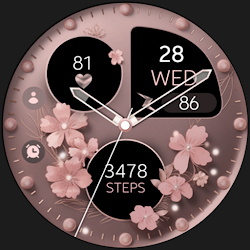
Butterfly Analog v2 Watch Face
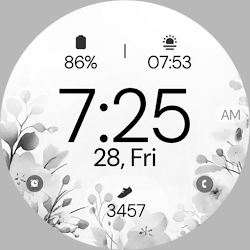
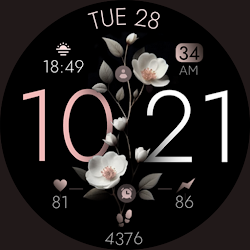
Butterfly analog watch face with elegant watercolor design for Wear OS devices.
Downloads100+
Total reviewsNo data available
Average scoreNo data available
Released on Google PlayMar 9, 2025
Last updated on Google PlayAug 21, 2025
DiscoveredJul 2, 2026
Last updatedAug 19, 2026
Butterfly Analog v2 - Elegant Watch Face
Give your Wear OS smartwatch a graceful touch with Butterfly v2. This analog watch face highlights watercolor butterflies in soft or vibrant colors, paired with a clean, modern layout. Customize complications, colors, and shortcuts to match your style, ideal for daily wear or special occasions. Enjoy a serene yet practical design that brings both beauty and simplicity to your wrist.
Key Features:
- Built with Watch Face Format
- Customizable colors to match your style or outfit.
- x2 app shortcuts for quick access to essential features.
- x3 complications slot for info like steps, heart rate and more.
- x4 Watch-Hands
- x7 Index design
- Battery level indicator.
- Always-On Display (AOD) mode.
Compatible with all Wear OS devices API 33+ including Google Pixel Watch, Samsung Galaxy Watch 7, 6, 5 and more.
Not Suitable for Rectangular Watches
Customization
1. Tap and hold on your watch display.
2. Select "Customize".
Need Assistance?
- Installation Guide: https://www.monkeysdream.com/install-watch-face-wear-os
- Support: info@monkeysdream.com
Stay Connected:
- Website: https://www.monkeysdream.com
- Instagram: https://www.instagram.com/monkeysdreamofficial
- Newsletter: https://www.monkeysdream.com/newsletter
Give your Wear OS smartwatch a graceful touch with Butterfly v2. This analog watch face highlights watercolor butterflies in soft or vibrant colors, paired with a clean, modern layout. Customize complications, colors, and shortcuts to match your style, ideal for daily wear or special occasions. Enjoy a serene yet practical design that brings both beauty and simplicity to your wrist.
Key Features:
- Built with Watch Face Format
- Customizable colors to match your style or outfit.
- x2 app shortcuts for quick access to essential features.
- x3 complications slot for info like steps, heart rate and more.
- x4 Watch-Hands
- x7 Index design
- Battery level indicator.
- Always-On Display (AOD) mode.
Compatible with all Wear OS devices API 33+ including Google Pixel Watch, Samsung Galaxy Watch 7, 6, 5 and more.
Not Suitable for Rectangular Watches
Customization
1. Tap and hold on your watch display.
2. Select "Customize".
Need Assistance?
- Installation Guide: https://www.monkeysdream.com/install-watch-face-wear-os
- Support: info@monkeysdream.com
Stay Connected:
- Website: https://www.monkeysdream.com
- Instagram: https://www.instagram.com/monkeysdreamofficial
- Newsletter: https://www.monkeysdream.com/newsletter
Follow Monkey's Dream — new faces in your inbox
One email per day at most — a single digest of yesterday's newly indexed watch faces from all developers you follow. Double opt-in, one-click unsubscribe, nothing else ever.
More from Monkey's Dream