New Paid
W6 Style WF Wear OS 5+
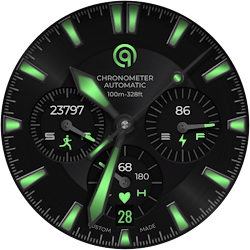
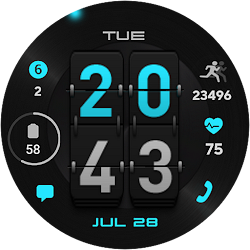
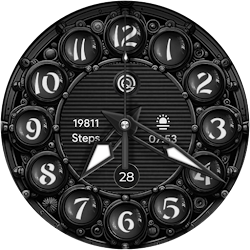
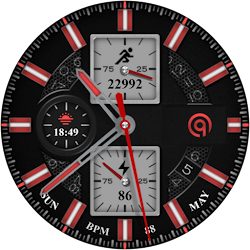
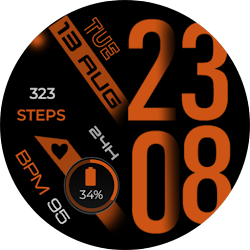
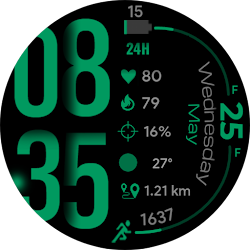
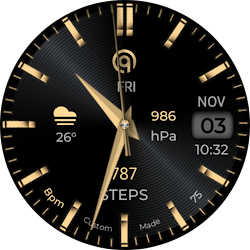
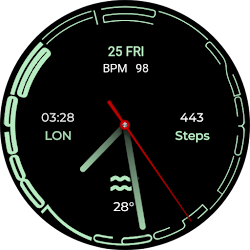
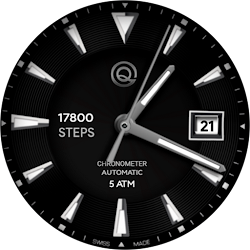
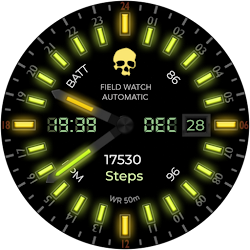
A stylish and colorful watchface with many customizations and style.
Downloads10,000+
Total reviewsNo data available
Average scoreNo data available
Released on Google PlayJul 30, 2023
Last updated on Google PlayJul 29, 2026
DiscoveredJul 18, 2026
Last updatedAug 19, 2026
=======================================================
NOTICE: READ THIS ALWAYS BEFORE AND AFTER DOWNLOADING OUR WATCH FACE TO AVOID ANY SITUATION YOU DON'T LIKE.
=======================================================
This watch face for WEAR OS 5+ has been made in Samsung Galaxy Watch face studio.
I have physically tested on Samsung Watch 8 Classic 46mm , Samsung Watch 5 Pro, and Samsung Watch Ultra. It also supports other wear os 5+ devices. Some feature experience can be slightly different on other watches.
1.Tap at 1 o clock to open watch Google phone play store app.
2. Tap at 11 o clock to open Google Maps app on your watch.
3. Tap at 2 o Clock to open watch settings menu.
4. Tap at 4 o Clock to open watch phone app.
5. Tap at 5 o clock to open watch alarm app.
6. Tap at 8 o clock to open watch calendar menu.
7. Tap On BPM Text or Reading to open Heart rate counter.
8. Left , Right , Bottom Complications, Date Text, & Heart Rate reading & Complications can be hidden/Un-hidden separately from customization menu for main.
9. Customizable Complications can be customized from the customization menu.
10. Hands Styles option to change various hand styles in customization menu are available.
11. 3x AoD styles including default select-able via customization menu.
12. Seconds Movement can be changed as well from customization menu.
NOTICE: READ THIS ALWAYS BEFORE AND AFTER DOWNLOADING OUR WATCH FACE TO AVOID ANY SITUATION YOU DON'T LIKE.
=======================================================
This watch face for WEAR OS 5+ has been made in Samsung Galaxy Watch face studio.
I have physically tested on Samsung Watch 8 Classic 46mm , Samsung Watch 5 Pro, and Samsung Watch Ultra. It also supports other wear os 5+ devices. Some feature experience can be slightly different on other watches.
1.Tap at 1 o clock to open watch Google phone play store app.
2. Tap at 11 o clock to open Google Maps app on your watch.
3. Tap at 2 o Clock to open watch settings menu.
4. Tap at 4 o Clock to open watch phone app.
5. Tap at 5 o clock to open watch alarm app.
6. Tap at 8 o clock to open watch calendar menu.
7. Tap On BPM Text or Reading to open Heart rate counter.
8. Left , Right , Bottom Complications, Date Text, & Heart Rate reading & Complications can be hidden/Un-hidden separately from customization menu for main.
9. Customizable Complications can be customized from the customization menu.
10. Hands Styles option to change various hand styles in customization menu are available.
11. 3x AoD styles including default select-able via customization menu.
12. Seconds Movement can be changed as well from customization menu.
Follow OQ Watchfaces — new faces in your inbox
One email per day at most — a single digest of yesterday's newly indexed watch faces from all developers you follow. Double opt-in, one-click unsubscribe, nothing else ever.
More from OQ Watchfaces