New Free
Heart Rate Monitor - Watch
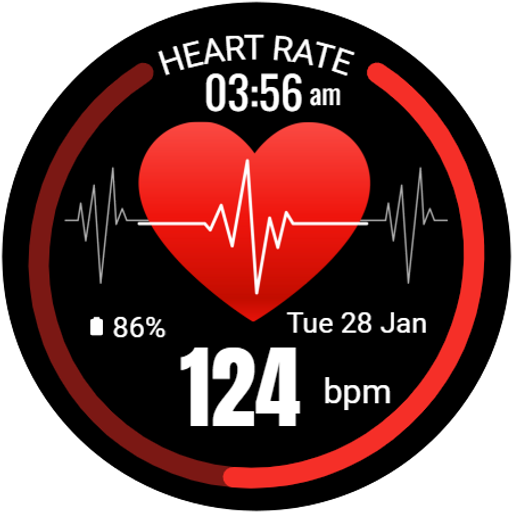
Track your heart rate in real-time with this dynamic watch face.
Downloads10,000+
Total reviewsNo data available
Average scoreNo data available
Released on Google PlayJan 24, 2025
Last updated on Google PlayAug 4, 2026
DiscoveredAug 14, 2026
Last updatedAug 14, 2026
Monitor your heart rate effortlessly with the Heart Rate Monitor Watch Face for Wear OS! Featuring a bold and easy-to-read design, this watch face not only displays your heart rate but also shows the time, date, and battery status, all in a clean and functional layout.
Stay in tune with your health by keeping your heart rate information always available right on your wrist, perfect for active users or those simply looking to monitor their fitness level.
⚙️ Watch Face Features
• Date, month and day of the week.
• Real-time heart rate monitoring
• Battery %
• Ambient Mode
• Always-on Display (AOD)
🎨 Heart Rate Monitor Watch Face Customization
1 - Touch and hold display
2 - Tap on Customize option
🎨 Heart Rate Monitor Watch Face Complications
Touch and hold display to open customization mode. You can customize the field with any data you want.
🔋 Battery
For better battery performance of the watch, we recommend disabling the "Always On Display" mode.
After installing the Heart Rate Monitor Watch Face, follow these steps:
1)Open the Companion App on your phone.
2)Tap "Install on Watch".
3)On your watch, select the Heart Rate Monitor Watch Face from your settings or watch face gallery.
Your watch face is now ready to use !
✅ Compatible with all Wear OS devices API 33+ including such as Google Pixel Watch, Samsung Galaxy Watch etc.
Not suitable for rectangular watches.
Thank you !
Stay in tune with your health by keeping your heart rate information always available right on your wrist, perfect for active users or those simply looking to monitor their fitness level.
⚙️ Watch Face Features
• Date, month and day of the week.
• Real-time heart rate monitoring
• Battery %
• Ambient Mode
• Always-on Display (AOD)
🎨 Heart Rate Monitor Watch Face Customization
1 - Touch and hold display
2 - Tap on Customize option
🎨 Heart Rate Monitor Watch Face Complications
Touch and hold display to open customization mode. You can customize the field with any data you want.
🔋 Battery
For better battery performance of the watch, we recommend disabling the "Always On Display" mode.
After installing the Heart Rate Monitor Watch Face, follow these steps:
1)Open the Companion App on your phone.
2)Tap "Install on Watch".
3)On your watch, select the Heart Rate Monitor Watch Face from your settings or watch face gallery.
Your watch face is now ready to use !
✅ Compatible with all Wear OS devices API 33+ including such as Google Pixel Watch, Samsung Galaxy Watch etc.
Not suitable for rectangular watches.
Thank you !
Follow jigu watchface — new faces in your inbox
One email per day at most — a single digest of yesterday's newly indexed watch faces from all developers you follow. Double opt-in, one-click unsubscribe, nothing else ever.
More from jigu watchface