New Free
Weather Forecast for Wear OS
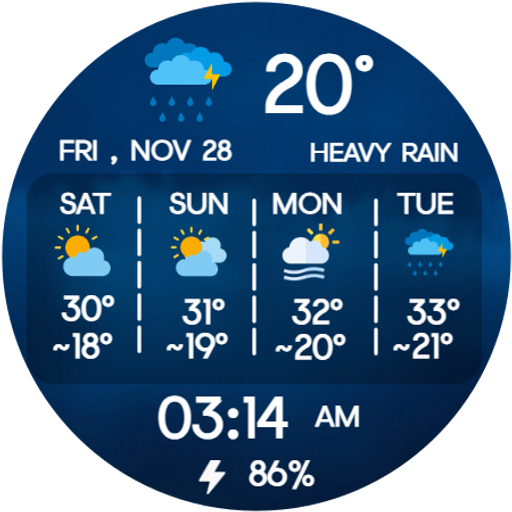
Digital weather watch face with hourly forecast, weekly temps & battery.
Downloads1,000+
Total reviewsNo data available
Average scoreNo data available
Released on Google PlayNov 29, 2025
Last updated on Google PlayAug 8, 2026
DiscoveredAug 18, 2026
Last updatedAug 18, 2026
Stay updated with real-time weather details right on your wrist with
Weather Forecast for Wear OS—a smart, visually rich watch face
designed to display hourly forecasts, weekly temperatures, and
essential daily stats. Perfect for users who rely on accurate weather
information throughout the day.
🌤 Perfect For:
Weather-conscious users who enjoy forecast, temperature, rain,
snow, storm alerts, digital displays, and detailed weather watch
faces.
📅 Ideal for Everyday Use:
Whether planning your day, traveling, exercising, or checking upcoming
weather changes, this watch face delivers clear and reliable updates
at a glance.
✨ Key Features:
1. Hourly/Weekly Weather Forecast with Icons (Rain, Snow, Clouds, Clear)
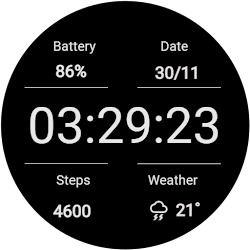
2. Digital Display: Time, date, battery % & weather details
3. 4-Day Weekly Temperature Panel
4. weather-style backgrounds
5. Always-On Display (AOD) Support
6. Optimized for smooth performance on all Wear OS smartwatches
⚙️ Phone App Features
•The companion app helps you install and locate the watch face
on your Wear OS device. No extra settings required.
⌚ Watch Face Features
• 12/24h Digital Time
• Date & Day
• Weekly Temperature Display
• Current Temperature & Condition
• Battery Percentage
• Always-On Display (AOD)
📲 Installation Instructions:
1. Open the Companion App on your phone.
2. Tap “Install on Watch.”
3. Select Weather Forecast for Wear OS from your watch face list.
✅ Compatibility:
• Compatible with all Wear OS devices (API 33+), including:
• Google Pixel Watch
• Samsung Galaxy Watch
• Other Wear OS watches
❌ Not suitable for rectangular watches.
• Keep your day in control with Weather Forecast for Wear
OS—your reliable weather companion, anytime and anywhere. 🌦️
Note : Weather may not update if your watch isn’t properly synced with
your phone. Make sure Bluetooth is connected, Location permission is
enabled, and your phone has an active internet connection. After
syncing, the weather will refresh automatically.
Weather Forecast for Wear OS—a smart, visually rich watch face
designed to display hourly forecasts, weekly temperatures, and
essential daily stats. Perfect for users who rely on accurate weather
information throughout the day.
🌤 Perfect For:
Weather-conscious users who enjoy forecast, temperature, rain,
snow, storm alerts, digital displays, and detailed weather watch
faces.
📅 Ideal for Everyday Use:
Whether planning your day, traveling, exercising, or checking upcoming
weather changes, this watch face delivers clear and reliable updates
at a glance.
✨ Key Features:
1. Hourly/Weekly Weather Forecast with Icons (Rain, Snow, Clouds, Clear)
2. Digital Display: Time, date, battery % & weather details
3. 4-Day Weekly Temperature Panel
4. weather-style backgrounds
5. Always-On Display (AOD) Support
6. Optimized for smooth performance on all Wear OS smartwatches
⚙️ Phone App Features
•The companion app helps you install and locate the watch face
on your Wear OS device. No extra settings required.
⌚ Watch Face Features
• 12/24h Digital Time
• Date & Day
• Weekly Temperature Display
• Current Temperature & Condition
• Battery Percentage
• Always-On Display (AOD)
📲 Installation Instructions:
1. Open the Companion App on your phone.
2. Tap “Install on Watch.”
3. Select Weather Forecast for Wear OS from your watch face list.
✅ Compatibility:
• Compatible with all Wear OS devices (API 33+), including:
• Google Pixel Watch
• Samsung Galaxy Watch
• Other Wear OS watches
❌ Not suitable for rectangular watches.
• Keep your day in control with Weather Forecast for Wear
OS—your reliable weather companion, anytime and anywhere. 🌦️
Note : Weather may not update if your watch isn’t properly synced with
your phone. Make sure Bluetooth is connected, Location permission is
enabled, and your phone has an active internet connection. After
syncing, the weather will refresh automatically.
Follow jigu watchface — new faces in your inbox
One email per day at most — a single digest of yesterday's newly indexed watch faces from all developers you follow. Double opt-in, one-click unsubscribe, nothing else ever.
More from jigu watchface