New Paid
Digital Watch Face M5
by VG Faces
Modern Wear OS digital face with weather, progress bars & custom color schemes.
Downloads100+
Total reviewsNo data available
Average scoreNo data available
Released on Google PlayOct 16, 2024
Last updated on Google PlayApr 8, 2026
DiscoveredJul 3, 2026
Last updatedAug 15, 2026
M5: Modern Digital Watch Face
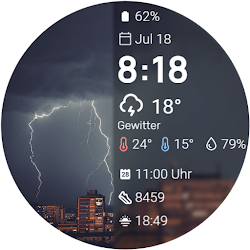
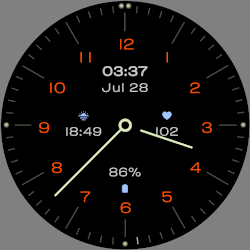
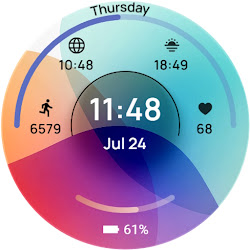
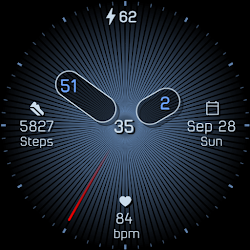
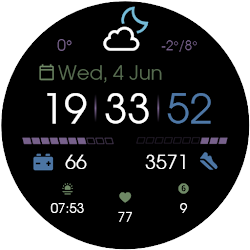
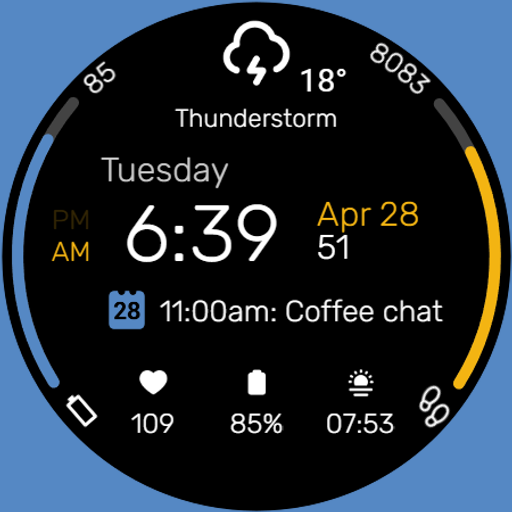
Elevate your Wear OS experience with the M5 Digital Watch Face. Blending sleek aesthetics with powerful functionality, it features dynamic progress bars and a highly customizable information panel to keep your daily essentials perfectly organized on your wrist.
Key Features:
• Dynamic Progress Bars: Quickly monitor your daily goals with stylish, colored edge arcs dedicated to your Battery status and Step count.
• Comprehensive Weather: Stay updated with a prominent weather section displaying current conditions and temperature.
• Customizable Information Panel: Tailor the central data area to show your most important updates, such as your next calendar event.
• Extensive Color Schemes: Choose from a wide variety of vibrant color combinations to personalize the progress bars and accents to match your exact style.
• Leading Zero Control: Customize your time format by choosing to show or hide the leading zero on the digital hour.
• Minimalist AOD: Save battery with a clean Always-On Display that keeps just the essential digital time, date, and day of the week visible.
Smart Shortcut System:
Navigate instantly with predefined and custom tap zones:
• Tap Time: Opens Alarm settings
• Tap Day: Opens Calendar
• Tap Weather Icon: Customizable App Shortcut
• 3 App Shortcuts: additional customizable zones at the bottom for quick access to your favorite apps or settings
Installation:
1. Ensure your watch is connected via Bluetooth.
2. Download M5 from the Google Play Store.
3. Long-press your watch screen, scroll to the end, and select "M5" to apply.
Compatibility:
Designed exclusively for Wear OS 5+ devices, including:
• Samsung Galaxy Watch
• Google Pixel Watch
• And other newer devices running Wear OS 5 or higher.
Elevate your Wear OS experience with the M5 Digital Watch Face. Blending sleek aesthetics with powerful functionality, it features dynamic progress bars and a highly customizable information panel to keep your daily essentials perfectly organized on your wrist.
Key Features:
• Dynamic Progress Bars: Quickly monitor your daily goals with stylish, colored edge arcs dedicated to your Battery status and Step count.
• Comprehensive Weather: Stay updated with a prominent weather section displaying current conditions and temperature.
• Customizable Information Panel: Tailor the central data area to show your most important updates, such as your next calendar event.
• Extensive Color Schemes: Choose from a wide variety of vibrant color combinations to personalize the progress bars and accents to match your exact style.
• Leading Zero Control: Customize your time format by choosing to show or hide the leading zero on the digital hour.
• Minimalist AOD: Save battery with a clean Always-On Display that keeps just the essential digital time, date, and day of the week visible.
Smart Shortcut System:
Navigate instantly with predefined and custom tap zones:
• Tap Time: Opens Alarm settings
• Tap Day: Opens Calendar
• Tap Weather Icon: Customizable App Shortcut
• 3 App Shortcuts: additional customizable zones at the bottom for quick access to your favorite apps or settings
Installation:
1. Ensure your watch is connected via Bluetooth.
2. Download M5 from the Google Play Store.
3. Long-press your watch screen, scroll to the end, and select "M5" to apply.
Compatibility:
Designed exclusively for Wear OS 5+ devices, including:
• Samsung Galaxy Watch
• Google Pixel Watch
• And other newer devices running Wear OS 5 or higher.
Follow VG Faces — new faces in your inbox
One email per day at most — a single digest of yesterday's newly indexed watch faces from all developers you follow. Double opt-in, one-click unsubscribe, nothing else ever.
More from VG Faces