New Deal
Game watch face
by VG Faces
Gamer Wear OS digital face: action style, 2 complications, health stats & AOD
Downloads10+
Total reviewsNo data available
Average scoreNo data available
Released on Google PlayJan 22, 2025
Last updated on Google PlayAug 11, 2026
DiscoveredJul 3, 2026
Last updatedAug 19, 2026
Deal detectedAug 13, 2026
Game Watch Face for Wear OS
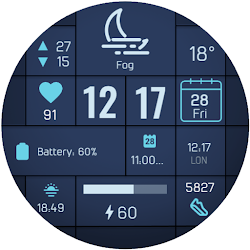
Bring the thrill of the open world directly to your wrist with the Game Watch Face for Wear OS. Inspired by iconic action video games, this digital face features a minimap background and classic gaming fonts, delivering a bold aesthetic along with your essential daily stats.
Key Features:
• Action Game Style: Stand out with a unique minimap background, recognizable gaming typography, and decorative "wanted" stars.
• 2 Customizable Complications: Personalize your display with two dedicated slots for the information you value most.
• Health & Device Stats: Keep track of your daily Step counter, Heart rate, and current Battery status at a glance.
• Always On Display: Manage your battery life with a sleek, minimalist AOD mode that displays only the digital time in the signature font.
Installation:
1. Ensure your watch is connected via Bluetooth.
2. Download from the Google Play Store.
3. Long-press your watch screen, scroll to the end, and select the watch face to apply.
Compatibility:
Designed exclusively for Wear OS 5+ devices, including:
• Samsung Galaxy Watch 8 & Ultra
• Google Pixel Watch 4
• And other newer devices running Wear OS 5 or higher.
Bring the thrill of the open world directly to your wrist with the Game Watch Face for Wear OS. Inspired by iconic action video games, this digital face features a minimap background and classic gaming fonts, delivering a bold aesthetic along with your essential daily stats.
Key Features:
• Action Game Style: Stand out with a unique minimap background, recognizable gaming typography, and decorative "wanted" stars.
• 2 Customizable Complications: Personalize your display with two dedicated slots for the information you value most.
• Health & Device Stats: Keep track of your daily Step counter, Heart rate, and current Battery status at a glance.
• Always On Display: Manage your battery life with a sleek, minimalist AOD mode that displays only the digital time in the signature font.
Installation:
1. Ensure your watch is connected via Bluetooth.
2. Download from the Google Play Store.
3. Long-press your watch screen, scroll to the end, and select the watch face to apply.
Compatibility:
Designed exclusively for Wear OS 5+ devices, including:
• Samsung Galaxy Watch 8 & Ultra
• Google Pixel Watch 4
• And other newer devices running Wear OS 5 or higher.
Follow VG Faces — new faces in your inbox
One email per day at most — a single digest of yesterday's newly indexed watch faces from all developers you follow. Double opt-in, one-click unsubscribe, nothing else ever.
More from VG Faces